For a long time, my professional headshot was just a cropped photo from a friend’s wedding. The resolution was good enough as long as no one looked too closely. I’ve since used the same headshot on my LinkedIn profile, personal website, and even my resume. But I realized that looking like a tourist on LinkedIn wasn’t helping my career anymore.
I wanted a clean, corporate-style headshot, but I didn’t want to spend $500 on a stiff studio session. That’s when I tried an AI professional headshot generator. I managed to get a gallery of professional portrait photos while in my old hoodie. It was thanks to a tool called AIAI.com, and it turned out to be one of the best career moves I’ve made in a long time.
A New Headshot Makes a Difference
A professional headshot does quiet work in the background.
I didn’t notice it until I started paying attention to how people reacted to my profile. Recruiters see your photo before your resume. Clients notice your face before your work.
A clear, well-lit LinkedIn headshot signals attention to detail. It suggests you take your work seriously. It helps build trust before the first conversation even starts.
You don’t need to look flashy. You need to look like you belong there.
Use More Convenient and Efficient Tools
Your time is worth more than a four-hour commute to a photo studio. AI professional headshot generator offers more flexibility than a traditional studio session. You control the timing, the style, and the final result. You can generate professional portraits quickly, without needing a studio or special equipment.
Why AIAI.com Worked for Me
I tested more than one AI Professional Headshot Generator for professionals, and the differences showed up fast.
Some results felt overdone. The skin looked unnaturally smooth. Edges were too sharp. The photos didn’t resemble real headshots you’d expect to see on a company website.
What stood out with AIAI.com was how natural everything felt. The lighting looked balanced, with shadows falling naturally. Nothing felt exaggerated or artificial.
When I looked at the final shots, they felt like a cleaner, more polished version of me.
Studio Quality Lighting Results
Most people assume good headshots come down to filters. I used to think the same way.
In reality, lighting does most of the heavy lifting. It shapes your face, adds depth, and separates you from the background in a way that looks natural and professional.
This AI professional headshot generator focuses heavily on lighting accuracy. The portraits had real depth. Eyes didn’t look flat or glassy. Skin tones stayed realistic. The final images looked like high-end corporate headshots, not digital artwork.
AI Portrait Generation vs Editing Apps
Basic photo editing apps rely on blur and smoothing. That’s why the results often feel fake.
AIAI.com as a sophisticated image to image generator. Instead of editing over an existing photo, it rebuilds the image using your actual facial features and places you into a realistic professional setting.
Your expression stays intact. Your eyes still look like yours. The result looks like something you’d expect from a real studio session.
Most people wouldn’t guess the headshots were AI-generated unless you mentioned it.
My Personal Experience on AIAI.com
Actually, I was a little nervous. I’m not a tech genius, and I usually hate photos of myself. I opened the site on my phone while sitting on my couch. The process was so simple.
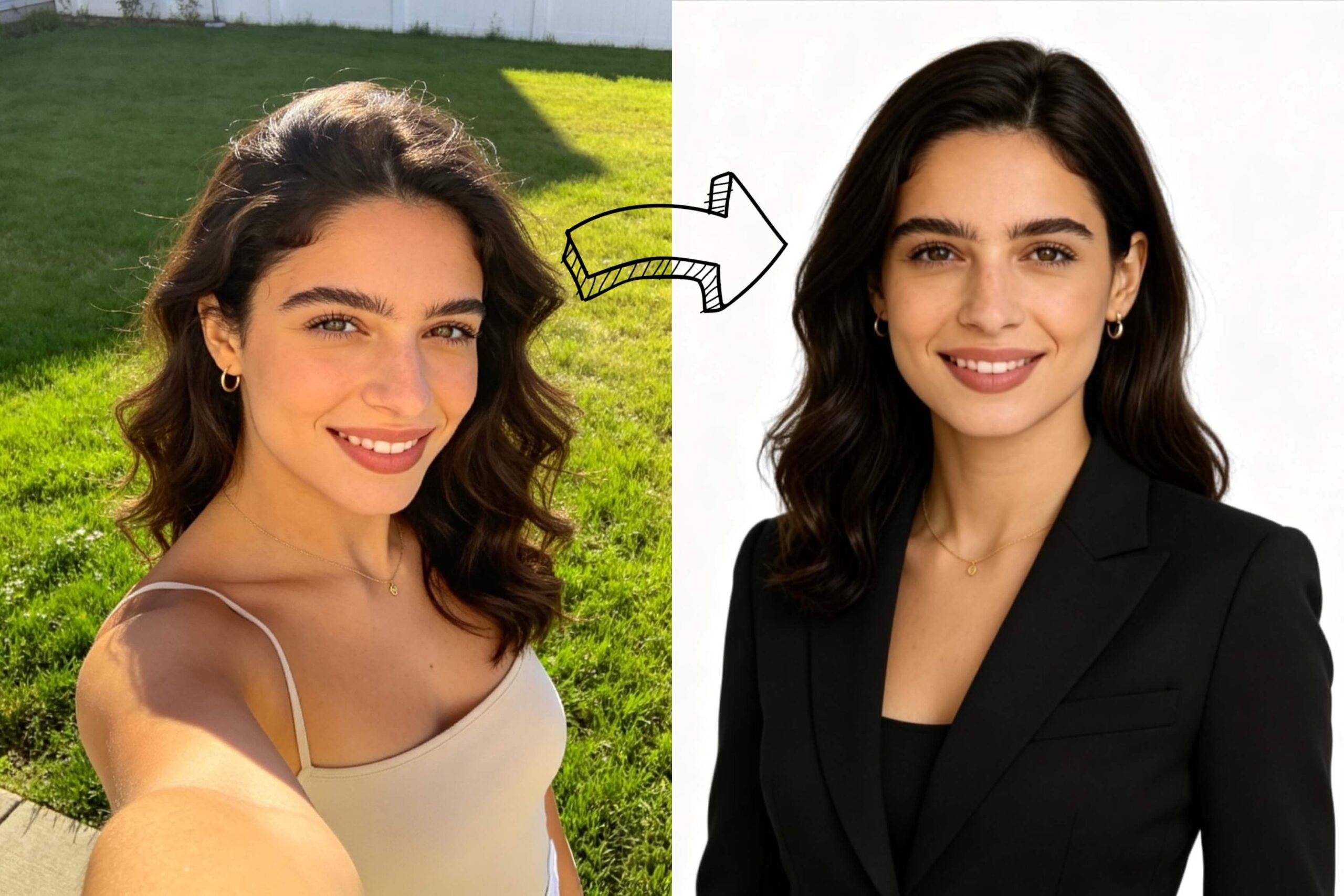
I went through my phone and picked out about ten random photos. Most of them were just casual backyard shots and a few selfies where I was wearing a faded camisole. I made sure my face was clear and I wasn’t squinting in the sun. I even used a photo where my hair was a complete mess from the wind.
A few minutes later, I got a professional headshot. I was shocked. My hair was perfectly styled and the navy suit they put me in looked like expensive wool I owned. I could even see the tiny textures on the tie. The background was a clean, crisp white. It didn’t look like a computer made it. It looked like I had spent all day with a professional photographer.
The Steps to Using This Tool
If you want to try it, it is super easy:
- Upload your favorites: Select clear selfies of yourself.
- Pick the style: Like going with a classic “business” look.
- Generate: Let the tool do the rest.
- Download: Save your new professional portfolio.
Smart Tips to Get More Natural Results
To get better shots, you could try these:
- Show your eyes: Skip the photos with sunglasses or big hats that cast shadows. The tool needs to see your eyes to make the photo feel real.
- Find a window: I found that my best results came from photos taken in natural light. Standing near a window during the day works perfectly. It helps the tool map your face without any weird, grainy shadows.
- Pick your vibe: Think about your actual office. If you are in a creative field, a stiff suit might look out of place. I tried a casual sweater look first, and then a button-down shirt. It’s worth testing a few styles to see which one feels the most like you.
Frequently Asked Questions
Q: How much does an AI professional headshot generator cost?
A: Using AIAI.com costs far less than traditional studio photography. Instead of paying hundreds of dollars for a single session, you get multiple professional headshots for a fraction of the price. Pricing is transparent and shown upfront.
Q: Is my data secure?
A: Yes. Uploaded photos are used only to generate your headshots. According to AIAI.com’s privacy policy, images are not sold or reused, and data handling follows standard security practices.
Q: Will my photos stay private?
A: Your AI-generated headshots are private. They aren’t published publicly, and you control how and where you use them.
Q: Can people tell my headshot was AI-generated?
A: In my experience, no. The photos look like standard studio portraits. I’ve already updated my LinkedIn profile and haven’t received a single question about it being AI.
Begin Your New Professional Chapter
Updating my headshot was one of the smartest moves I made for my career. I have already noticed more recruiters reaching out on LinkedIn. Plus, I feel so much more confident when I send out my resume now.
If you are still using that cropped wedding photo or a blurry selfie, give AIAI.com a shot. This AI Professional Headshot Generator is quick, practical, and surprisingly effective.

OpenAI is rumored to release GPT-5.2 this Tuesday, December 9, in a "Code Red" response to Google's Gemini 3. Here Read more
We all take digital photos with our phones every day. They’re clear, convenient, and easy to save—but somehow, they often Read more
Design stunning postcards instantly with AI Postcard Generator. Create travel postcards, greeting cards, and custom designs using AIAI.com—no design skills Read more

Black Friday Visual Guide: From Black Friday Banners to Multi-Scene Product Images, AI Helps Merchants Succeed in Black Friday Marketing Read more


