How I Reduced AI Costs by 96% with All-in-One AI Tool
This article shares a real case study from one of our clients. In today’s AI-driven creative landscape, tool fragmentation has become a silent budget killer. Freelancers and small businesses often find themselves drowning in overlapping subscriptions while sacrificing productivity switching between platforms. What follows is the story of how one designer transformed their workflow and slashed monthly AI expenses by 96% through strategic integration.
The Pain of AI Tool Fragmentation for Freelancers
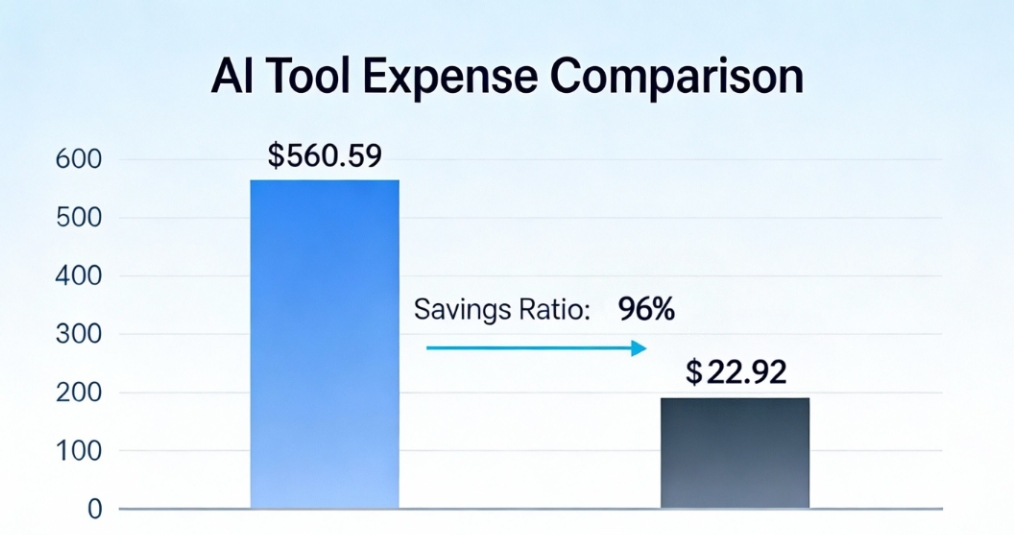
In early 2025, Alex, a freelance designer, was drowning in AI tool fragmentation. Subscribed to 8 different AI tools including GPT 5.2 Premium, Gemini 3 Pro, and Nano Banana Pro Image Generator, his monthly bill hit $560.59. Most frustrating was maintaining at least 3 AI tool windows open on his MacBook at all times—remembering login passwords alone became a daily headache.
Worse was the efficiency disaster from constant platform switching. He calculated spending 1.5 hours daily transferring files between tools, adjusting settings, and relearning interfaces. Just last week’s e-commerce product page required switching between GPT 5.2 for copywriting, Nano Banana for images, Flux Kontext for rendering, and another tool for format conversion—at least 4 platform switches with frequent file version confusion.
Bill Audit Uncovering Hidden Cost Truths
When the credit card bill crossed $500 again, he decided to examine AI tool spending closely—only to discover using just 37% of each tool’s features, with massive feature overlap! Here’s his monthly expense breakdown:
| Tool Name | Monthly Cost | Core Features |
|---|---|---|
| Gemini 3 Pro | $19.9/month | Multimodal analysis, real-time data access |
| GPT 5.2 | $200/month | Advanced reasoning, multitasking capabilities |
| DeepSeek V3.1 | ¥4/million tokens | High-precision reasoning, strong mathematical abilities |
| Nano Banana Pro | $11.99/month | Efficient image generation, diverse styles |
| Flux Kontext Max | $15.9/month | High-resolution images, rich details |
| Stable Image Ultra | $0.08/image | Pay-as-you-go image generation |
| Doubao Seedream 4.0 | Free | Basic image generation, suitable for rapid prototyping |
| Veo 3.1 | $39.9/month | Text-to-video, video editing |
| Sora 2 Pro | $200/month | High-fidelity video generation |
| Kling v2.5 | $0.06/second | Pay-as-you-go video generation |
| Wan 2.5 | $34.9/month | Multi-style video creation, rich special effects |
| Total | $560.59/month |
Source: Alex’s Q2 2025 credit card statements
The audit revealed “tool bloat”: Alex kept adding tools for temporary needs—like the specialized 3D modeling AI subscribed 8 months ago and used just once. Most concerning was maintaining 3 nearly identical image optimization tools simply because of forgotten prior subscriptions.
Turning Point Discovering Intelligent Creation Integration
At a designer community meetup, Alex first learned about AI tool integration platforms. After two weeks of testing, he chose AIAI.COM ultimate plan—primarily for its integration of 30+ leading AI models, unified workspace, pay-as-you-go model, and compatibility with existing workflows.
Honestly, his initial concerns lingered: Would learning a new system delay ongoing projects? Could it match specialized tools’ capabilities? Those worries vanished on day one—the intuitive interface with frequently used features in the left toolbar proved more efficient than separate platforms.
The benefits became immediately apparent:
- Unified Workspace: He now creates copy, designs, and renders in one interface with automatic project file organization—no more password management. Last week’s smart home product manual took just 3 hours (50% faster than before).
- Flexible Resource Allocation: Monthly credits adapt to needs—more for image models during design-heavy months, shifted to text tools when documentation is required.
- Automatic Model Updates: The pleasant surprise? Immediate access to GPT 5.2 upon release at no extra cost! Previous model upgrades always meant price increases—now included in the fixed subscription.
- Data Security: Critical for freelancers, the platform’s end-to-end encryption eliminated cross-tool file transfer concerns—even clients noticed the improved security.
Remarkable Transformation From $560 to $22.9
After three months with the integrated platform, his credit card bill transformed dramatically: monthly AI costs dropped from $560.59 to $39.9—93% reduction in costs! Four key strategies drove this result:
On-Demand Resource Allocation: 300 monthly credits flexibly allocate between tasks—more for image models during design months, shifted to text tools for documentation projects.
Efficiency Gains: Cross-model workflow automation reduced repetitive tasks by 60%. Project timelines shortened by 25% on average, enabling 2-3 additional client projects monthly.
Automatic Model Updates: Subscription includes access to latest models like GPT 5.2 at no extra cost—saving at least $2,400 annually compared to previous upgrade fees.
Scenario-Based Feature Selection: Platform categorizes AI capabilities by use case (text, chat, effects), eliminating 40% of tool selection time. The system automatically recommends suitable models based on input—no more remembering which tool excels at logos vs. product descriptions.
Later, he upgraded to the annual plan for even greater savings—$274.99 annually (monthly equivalent of $22.92) versus $39.99 monthly billing—$194.89 additional savings (42.57% off)! Unexpectedly, work quality improved too—unified platform consistency impressed clients.
Ideal Users Who Benefits Most from AI Integration Platforms?
From experience, he recommends intelligent creation systems particularly for:
- Freelancers using 3+ AI tools simultaneously
- Users spending over $50 monthly on AI services
- Creators handling diverse AI tasks
- Non-technical users seeking AI simplicity
His process condensed into four steps:
- Monthly usage data review to optimize resource allocation—ensuring continuous improvement.
- Audit current AI tools to identify truly useful vs. redundant services—this revealed 3 immediately cancellable duplicates.
- Allocate credits based on workflow (recommended: 40% text, 30% image, 20% video, 10% other).
- Create custom workflow templates—he implemented 5 templates for further efficiency gains.
Case Insights From Tool Slave to AI Master
His experience reflects a growing trend among creators adopting AI integration platforms, bringing three significant changes:
- Cost StructureOptimization: Moving from fixed subscriptions to pay-as-you-go reduces overall spending by 60-80%. He invested savings in new equipment, further boosting productivity.
- Creation Efficiency: Unified interface reduces tool-switching time by 80%, allowing more focus on creativity rather than technical operations.
- Innovation Acceleration: Model combinations enable new workflows. His recent “one-click product promotion kit” workflow only became possible through seamless text-image-video model integration.


Turn static photos into natural-looking AI kissing videos. Our AI kissing video generator fixes face glitches, keeps identities stable, and Read more

Wasting time staring at your closet? Discover how to use AI to create instant outfit flat lays and visualize your Read more
As someone who tests AI tools regularly, I've downloaded plenty of AI-generated images for blog posts, social media content, and Read more

Transform your travel photos into professional magazine covers instantly with Nano Banana Pro's AI. Create stunning keepsakes, virtual travel experiences, Read more


