A Curly Hair Filter is an AI-powered tool that digitally alters the texture of your hair in a photograph. Unlike old “wig” apps that just paste a fake hairstyle over your head, the Curly Hair Filter on AIAI.com uses Generative AI to identify your existing hair strands and reconstruct them into curls, waves, or coils while maintaining your original hair color and lighting. It is the ultimate “try before you buy” tool for perms.
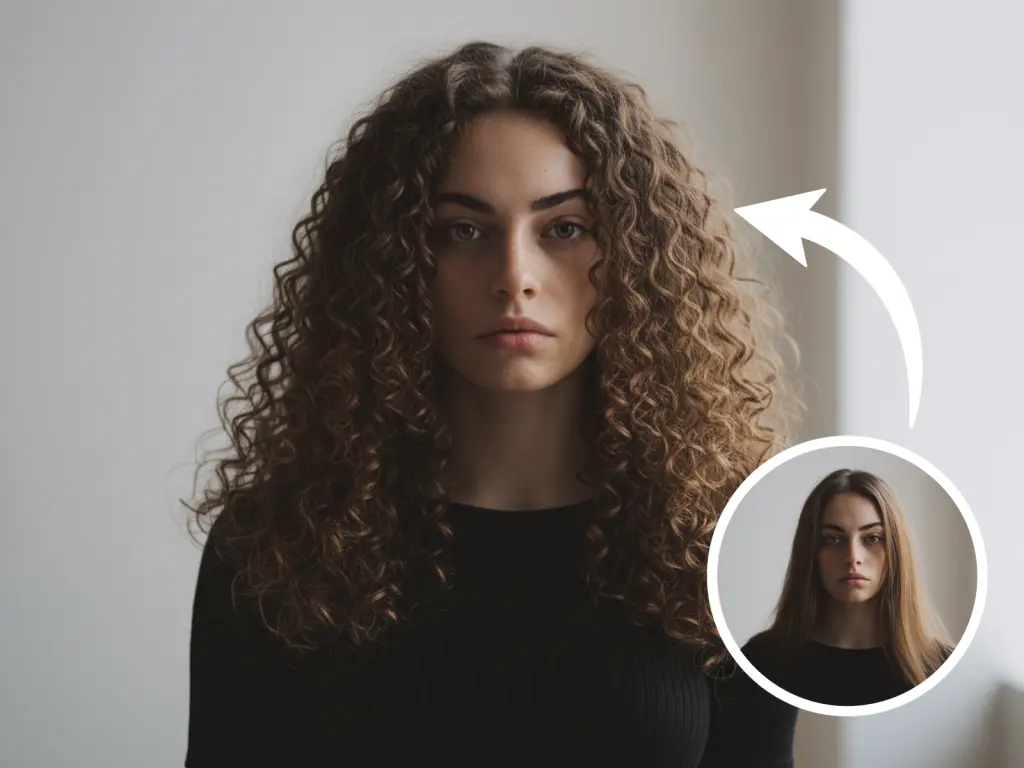
Why Is Everyone Using the Curly Hair Filter?
Here is why this tool is essential for anyone planning a makeover
1.The “Perm Anxiety” Cure
A perm is a chemical process that breaks the bonds of your hair. It damages the hair cuticle. Before you take that risk, you need to know whether the hairstyle suits your face shape. This tool acts as a “digital mirror,” giving you the confidence to say “Yes” (or “No”) to the stylist.
2. The “Curly Girl” Curiosity
Many people are born with naturally curly hair but have straightened it for years. This filter helps them visualize what their “natural potential” would look like if they started embracing their curls.
3. Gender-Neutral Styling
This isn’t just for women. The “Men’s Perm” (often called the Tikok Perm) is a massive trend. Guys are using the curly hair filter to see if they can pull off the messy, textured fringe look before heading to the barber.
How AI Hair Transformation Works
Why is the Curly Hair filter better than the ones on TikTok or Instagram?
Social Media Filters (AR):
- These usually layer a 2D graphic over your video feed.
- They often glitch when you move your head.
- They don’t account for your hair volume or density.
AI Curly Hair Filter (Generative):
- Segmentation: The AI identifies exactly where your hair ends and your background begins.
- Texture Synthesis: It doesn’t just overlay curls; it bends the pixels of your straight hair. It simulates how light hits the curves of a ringlet.
- Volume Calculation: Curly hair takes up more space than straight hair. The AI automatically adjusts the volume silhouette to make the transformation look physically plausible.
Step-by-Step: How to Curl Your Hair with AI
Ready to embrace the bounce? Follow this simple workflow.
Step 1: Upload a Selfie
Go to the Curly Hair Filter page. Upload a clear, front-facing photo.
Tip: For the best results, use a photo where your current hair is visible (not hidden under a hat).
Step 2: Generate and Compare
Click Generate. Download the result to show your hairstylist.
Comparison (AI vs. Apps)
| Feature | AIAI Curly Hair Filter | FaceApp / Mobile Editors | Instagram Filters |
| Realism | High (Generative) | Medium (Overlay) | Low (Cartoonish) |
| Keep Hair Color | Yes (Exact Match) | Sometimes changes color | No |
| Resolution | High (4K Support) | Standard | Screen Resolution |
| Cost | Free Trial | Freemium | Free |

Discover the best free AI image to video tools in 2026. Compare top AI video generators for realistic animation, social Read more
We all take digital photos with our phones every day. They’re clear, convenient, and easy to save—but somehow, they often Read more

OpenAI is rumored to release GPT-5.2 this Tuesday, December 9, in a "Code Red" response to Google's Gemini 3. Here Read more

Seedream 4.5 offers stable characters, readable text, and consistent visuals—perfect for designers, artists, and quick, reliable AI-generated projects.


