If you’ve ever thought about changing your hair color, you probably know the feeling — excitement mixed with a little panic.
What if it doesn’t suit you?
What if it makes your skin look dull?
What if you regret it the moment you walk out of the salon?
That’s exactly why I started using an AI hair color changer with the Nano Banana Pro model. It lets you see different hair colors on your own photo before committing to actual dye. No risk, no pressure — just a realistic preview that helps you decide with more confidence.
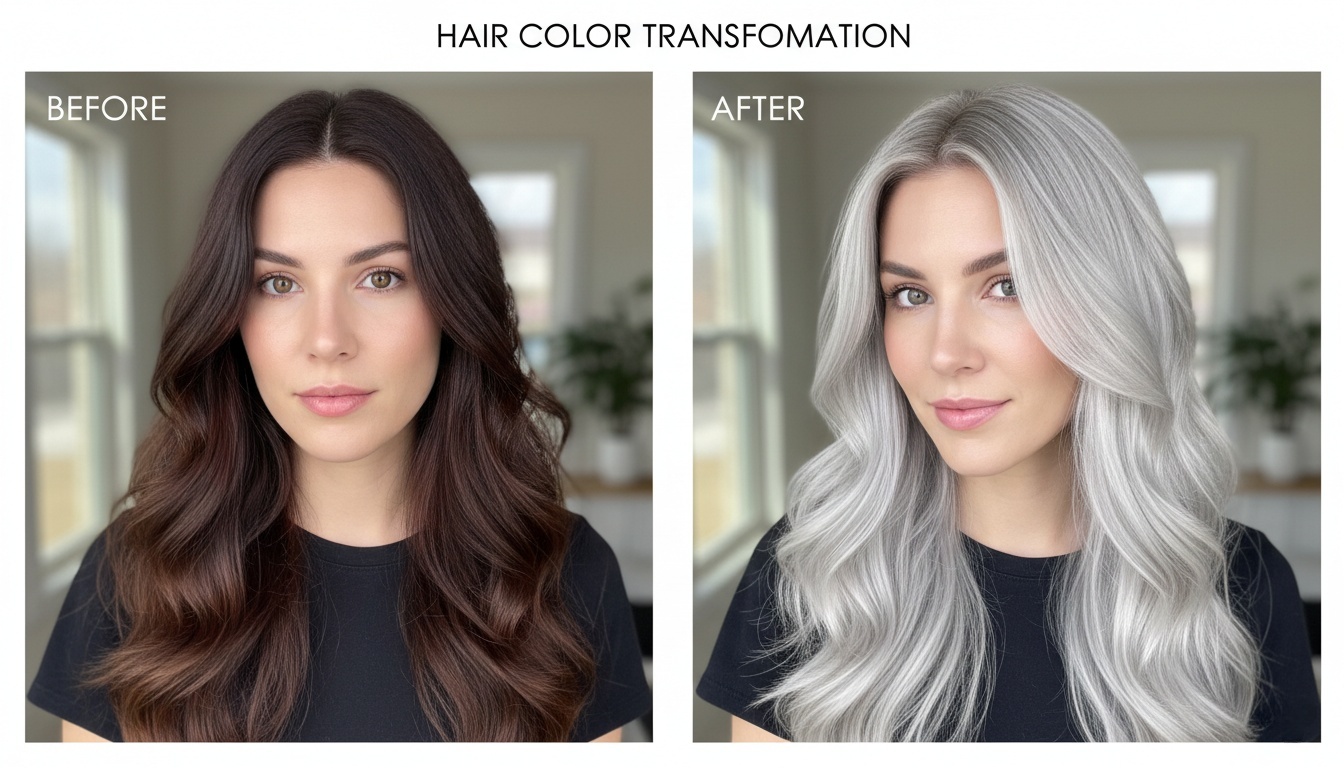
The Problem With Choosing a Hair Color (And Why Guessing Rarely Works)
With the new year around the corner, you might be thinking about changing your hair color — just like I am. But once you start choosing a shade, it quickly gets complicated.
Color charts never show the real result. Pinterest reference photos? Just references — lighting, skin tone, and hair volume all make a difference.
I learned this the hard way after several dye jobs. Some trendy colors simply didn’t suit me. The issue wasn’t the color — it was that I had no way to see how it would look on my own face before making a decision.
That’s why an AI hair color changer feels genuinely useful. It doesn’t guarantee a perfect match, but it gives you something visual before you dye — less guessing, more clarity. Even just ruling out colors that clearly don’t work can make the final result feel closer to what you’re hoping for.
How to Use an AI Hair Color Changer (Simple Steps)
- Upload a clear photo — a regular selfie works fine
- Choose a hair color or type in the shade you want
- Adjust the intensity if the tool allows it
- Compare different colors side by side
- Save the results for reference
That’s it. No design skills, no complicated setup.
Top AI Hair Color Trends to Try in 2026
Hair color trends in 2026 are shifting from bold, flashy shades to texture, subtlety, and natural elegance. The focus is on glossy, healthy-looking hair and seamless color transitions — what many are calling “Effortless Luxury.”
1. Rich & Dark Tones
- Espresso Brown: Deep, almost-black brown with high shine that flatters most skin tones.
- Cherry Cola: Subtle wine-red over dark brown — understated indoors, striking outdoors.
2. Earthy & Natural Shades
- Teddy Bear Brown: Warm, soft brown that feels cozy and gentle.
- Milk Tea Hair: Light, airy brown with cool gray undertones for a natural, effortless look.
3. Color Melting Techniques
- Seamless blending: Multiple shades melt together along the hair, no harsh lines.
- Low maintenance: Deeper roots reduce visible regrowth, keeping the style fresh longer.
Using an AI hair color changer is the perfect way to preview these shades and techniques before committing to the dye.
My Experience Using an AI Hair Color Changer
I always thought lighter hair wouldn’t suit me, so I stuck to dark brown for years. Out of curiosity, I tried an AI hair color changer and tested a few warmer shades.
To my surprise, one of them actually made my skin look brighter and softer — not harsh like I imagined. That preview didn’t force me to dye my hair, but it gave me the confidence to finally try something new at the salon.
Sometimes, that’s all you need.
What an AI Hair Color Changer Can’t Replace
AI previews are helpful, but they’re not perfect.
They can’t fully predict:
- How your hair texture will affect the final result
- How the color fades over time
- The technique your stylist uses
Think of it as a decision-making tool, not a replacement for professional advice.
Where to Try an AI Hair Color Changer Online
There are several tools available online now. Look for one that lets you upload your photo easily and shows natural-looking results.
Some platforms, like AIAI.com, make the process especially simple — you can upload a photo, try different hair colors instantly, and get a realistic preview without complicated settings or editing. It’s an easy way to experiment before making a real change.
Learn how to use an AI-powered Veo Watermark Remover to delete Google Veo video watermarks online quickly and create clean, Read more

Life in plastic, it's fantastic! Use the best AI Barbie Generator to turn your selfies into stunning dolls. Create custom Read more
Why I Turned to AI for My Cat's Birthday Photos My cat, Haru, is the light of my life. With Read more
Need a last-minute Valentine’s gift that isn't generic? Learn how to use AI to create custom love coupons and cards Read more


