If you spend any time on TikTok, Instagram Reels, or X (formerly Twitter) lately, you’ve likely seen the latest wave of AI-generated content: static photos morphing into video. Especially the AI kissing video trend, where a static photo of two characters, such as Harry Potter and Draco Malfoy, Batman and The Joker, or even two celebrities who have never met, morphs into a video where they start kissing.
But if you have tried to create one of these AI kissing videos yourself using standard AI kissing video generator, you probably ran into the uncanny valley. Faces melt into each other, limbs disappear, and what should be a sweet or funny moment turns into a glitchy nightmare.
Why is this happening? The reality is that animating intimate interactions (where two subjects are extremely close) is one of the hardest problems for any AI video model to solve. In this guide, we’ll explain why most generators fail at this specific task, and how to use our latest AI video generatorto finally fix the glitch.
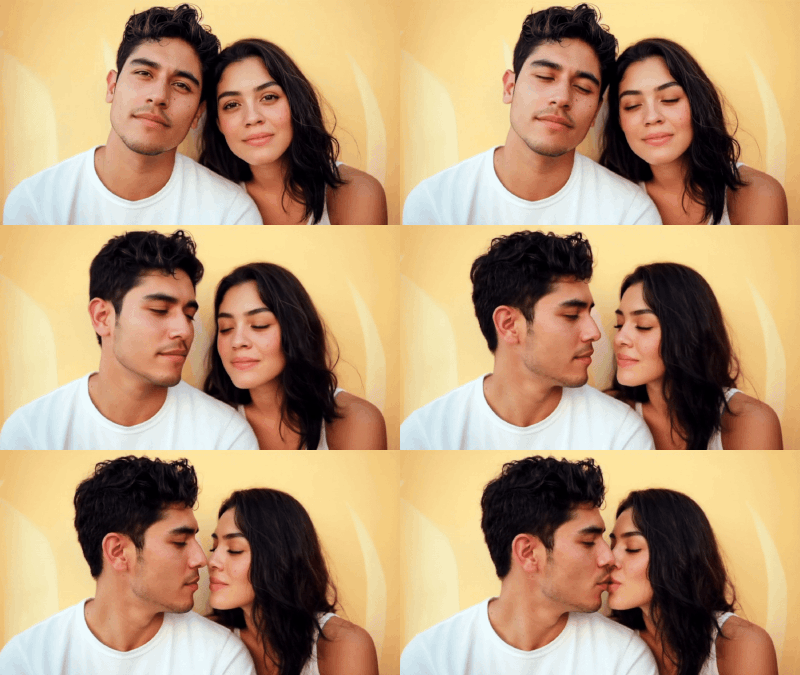
Why Do AI Kisses Look Weird?
To get a clean result, you need to understand the obstacle. Most Image-to-Video AI models rely on “diffusion.” They guess what the next frame should look like based on the pixels of the previous one.
When two faces are separated, the AI creates movement easily. But as soon as faces touch or overlap (like in a kissing scene), the AI loses track of whose nose belongs to whom. It blends the textures, resulting in the dreaded “face fusion” glitch.
Common Use Cases for AI Kissing Video
People use AI kissing video generators for more reasons than you might expect:
- Romantic Keepsakes
A short kissing clip could be a romantic message for long-distance couples or a creative anniversary post.
- Social Media Content
Creators use AI kissing videos for TikTok, Instagram Reels, or YouTube Shorts. This feature works for short-form storytelling, especially when showing “what if” moments.
- Fictional or Fantasy Scenarios
Fans generate kissing scenes between characters, celebrities (fictionalized), or original characters to visualize character relationships.
- Creative Projects
Creative workers can use AI kissing generators for many more reasons, such as music visual concepts, short films, concept art turned into motion and emotional prototypes for larger videos.
- Tool Experiments
Some users just want to test AI video tools without learning editing software. Since AI kissing videos often lead to “face-mashing” glitches, it is a good way to search for a better AI video generator tool.
What to Look for in a Good Image to Kiss Video AI Tool
Forget flashy buttons. Output quality matters more.
A solid tool should handle:
- Stable facial identity from start to finish
- Small, natural head movement
- Soft transitions, not sudden jumps
- Clear separation between two faces
- Emotion before action, even tiny expressions help
This is where specialized tools outperform general ones. A focused AI kissing video maker built for close-contact scenes usually does better than broad, do-everything platforms.
How to Create AI Kissing Videos
If you want to try this, the process is actually pretty straightforward. You don’t need to code. You don’t need a powerful gaming computer.
Pick the right photo
This is 90% of the work. If you upload a blurry photo where the people are in the shadows, the AI has to guess too much.
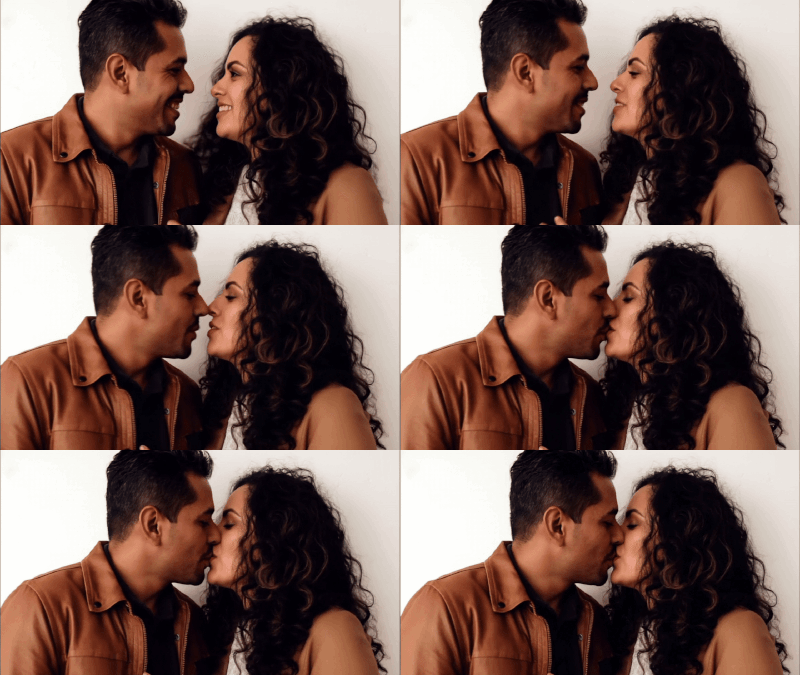
- Do: Use photos where the two subjects are already looking at each other (side profiles).
- Do: Make sure there is a little bit of space between them.
- Don’t: Use photos with extreme shadows.
Choose a specialized tool
General video tools often struggle with the physics of a kiss. They are great for landscapes, but they panic when dealing with intimate interactions. You need a tool designed to understand facial structures in close proximity. Using a dedicated AI kissing video generator is usually the safest way to ensure the characters maintain their identity instead of morphing into a blob.
Keep it short
The longer the video runs, the more likely the AI is to hallucinate strange details. A 3-to-5 second clip is usually the sweet spot. It is enough time to show the action without giving the software time to glitch out.
Moving beyond the kiss
Once you get comfortable with this, you might want to try other types of motion from static images. Maybe you want to make a photo of your dog running, or a picture of a car driving down the highway.
The principles are the same. You start with a high-quality image and tell the software what kind of movement you want. While the kissing trend is specific, a broad AI video generator can handle these wider shots and full-body movements much easier without overlapping subjects.
We are in the easiest era of content creation. Things that used to take a Hollywood studio three weeks to animate can now be done on your laptop while you drink your morning coffee.
Design unique Minecraft skins instantly with an AI Minecraft Skin Generator. Create custom skins from text prompts or images, customize Read more

AItab: Turn Your Browser into a Smart Assistant in Seconds AItab connects with the aiai.com ecosystem. It turns web browsers Read more

Wasting time staring at your closet? Discover how to use AI to create instant outfit flat lays and visualize your Read more
Designing an office layout always sounds easier than it actually is. On paper, it’s just desks, meeting rooms, maybe a Read more


