A few months ago, I was helping a small startup team in San Francisco figure out how to reorganize their office space. They had just moved into a new open-plan office, but within a week everyone was already complaining—too much noise, awkward desk placement, and meeting rooms that were always either too far away or constantly occupied.
I remember sitting there with a rough sketch on a whiteboard, trying to manually plan an Office Floor Plan that could actually make sense for their workflow. It quickly became clear how time-consuming and frustrating traditional space planning could be—every small change meant rethinking the entire layout, moving departments around, and guessing whether the flow would actually work in real life.
That experience is exactly why tools like an AI-powered Office Floor Plan generator are becoming so useful. Instead of starting from scratch with manual drawings, you can now describe your workspace needs in plain language and instantly generate optimized layouts that are practical, balanced, and easy to adjust.
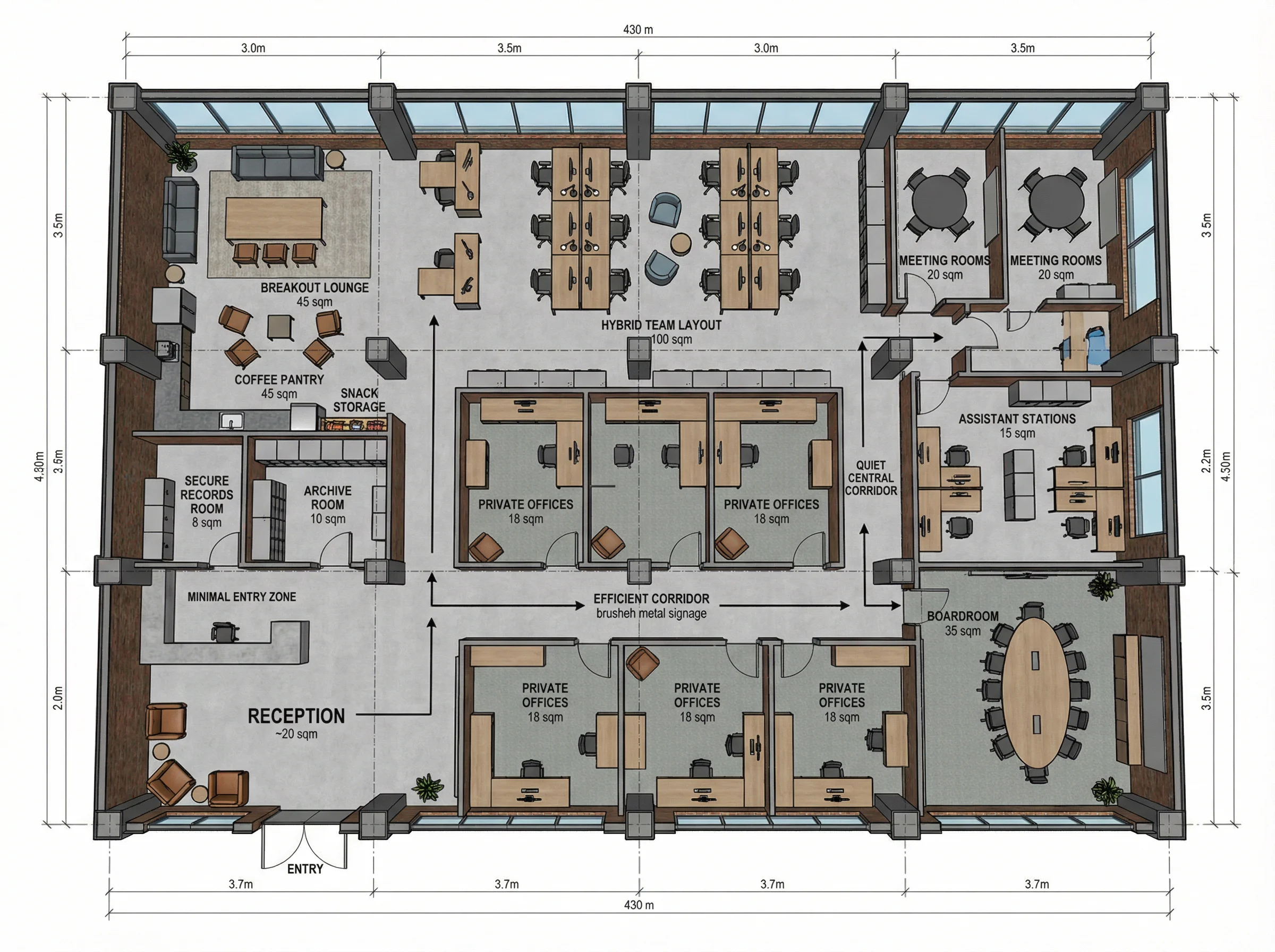
What Is an Office Floor Plan?
Definition
An office floor plan is a scaled diagram that shows the layout of an office space from a top-down view. It includes:
- Workstations
- Meeting rooms
- Reception areas
- Storage spaces
- Hallways and circulation paths
Purpose of an Office Floor Plan
A well-designed office floor plan helps:
- Improve workflow efficiency
- Maximize space utilization
- Enhance employee productivity
- Support collaboration and communication
- Ensure safety and accessibility compliance
Key Elements of an Effective Office Floor Plan
Space Zoning
Dividing office space into functional zones:
- Open work areas
- Private offices
- Meeting rooms
- Relaxation areas
Traffic Flow
Ensuring smooth movement between different areas without congestion.
Ergonomics
Designing layouts that support employee comfort and long-term health.
Lighting and Environment
Positioning workspaces based on natural light and ventilation.
Flexibility and Scalability
Allowing future expansion and layout adjustments.
Traditional Office Floor Plan Design Process
Requirement Gathering
Understanding business needs, team size, and workflow.
Manual Drafting
Using CAD or architectural software to create layouts.
Iteration and Feedback
Multiple revisions based on stakeholder input.
Final Approval
Converting design into construction-ready drawings.
This process often takes days or even weeks.
How AI Is Transforming Office Floor Plan Design
Text-to-Layout Generation
Users describe office needs in natural language, and AI generates layouts automatically.
Example:
“Design a modern office floor plan for 30 employees with 2 meeting rooms and an open workspace.”
Automated Space Optimization
AI calculates the most efficient use of available space.
Smart Room Placement
Automatically suggests optimal locations for meeting rooms, desks, and common areas.
Rapid Iteration
Generate multiple layout options instantly.
Reduced Manual Work
Minimizes the need for repetitive CAD drafting.
Benefits of Using AI for Office Floor Plan Design
Faster Design Process
Reduce planning time from days to minutes.
Cost Efficiency
Lower dependency on manual architectural drafting.
Better Space Utilization
AI optimizes layouts based on spatial constraints.
Improved Decision Making
Stakeholders can compare multiple layout options quickly.
Accessibility for Non-Experts
Even non-designers can create functional office layouts.
Common Types of Office Floor Plans
Open Office Layout
Encourages collaboration and communication.
Cubicle-Based Layout
Provides privacy and focused work environments.
Hybrid Office Layout
Combines remote-friendly and in-office workspaces.
Executive Office Layout
Designed for leadership teams and private offices.
Co-Working Space Layout
Flexible shared environments for multiple teams or companies.
Best Practices for Designing an Office Floor Plan
Define Clear Objectives
Understand whether the priority is collaboration, privacy, or flexibility.
Consider Employee Flow
Plan pathways to avoid congestion.
Use Modular Design
Enable easy reconfiguration of office space.
Prioritize Natural Light
Improve productivity and employee well-being.
Plan for Future Growth
Ensure scalability for expanding teams.
AI Office Floor Plan vs Traditional Design Tools
| Feature | AI Office Floor Plan Tools | Traditional CAD Tools |
|---|---|---|
| Speed | Fast | Slow |
| Ease of Use | High | Low to Medium |
| Automation | AI-driven | Manual |
| Iteration | Instant | Time-consuming |
| Cost Efficiency | Higher | Lower |
| Accessibility | Beginner-friendly | Professional skill required |
Use Cases of Office Floor Plan Design
Startups
Quickly design flexible office spaces for small teams.
Corporate Offices
Optimize large-scale workspace layouts.
Real Estate Development
Plan office buildings and commercial spaces.
Co-Working Spaces
Create adaptable layouts for multiple tenants.
Remote-Hybrid Work Models
Design flexible environments supporting hybrid work.
The Future of Office Floor Plan Design
AI-driven office planning is expected to evolve toward:
- Real-time 3D floor plan generation
- VR-based office walkthroughs
- Automatic compliance checking
- Smart furniture placement suggestions
- Energy-efficient space optimization
Conclusion
An office floor plan is a critical foundation for productivity, collaboration, and efficient space utilization.
With AI-powered tools, businesses can now design optimized office layouts faster, more accurately, and with far less effort than traditional methods. Whether you’re planning a startup workspace or a corporate office, AI makes office floor plan creation more accessible than ever.

DeepSeek V3.1 Release: Higher Thinking Efficiency, the First Step Towards the Agent Era The new DeepSeek-V3.1 has launched, almost six Read more

Nano Banana Pro: Unveiling the Updates and Usage Tips! This article is about Google DeepMind's Nano Banana Pro (Gemini 3 Read more
Stop redrawing sketches manually. Use an AI CAD generator to turn concepts or images into clean technical drawings instantly and Read more
Stop purchasing blindly! Use Nano Banana Pro's AI to generate realistic furniture previews. Learn precise prompt engineering to visualize colors, Read more


