Remove Text from Image with AI: Fast, Clean, and High-Quality Results
If you’ve ever tried to remove text from image, you know it’s rarely as simple as it sounds.
Whether it’s a watermark, subtitle, logo, or unwanted caption, text often overlaps with important parts of the image. Removing it manually can lead to blurred patches, broken textures, or obvious edits.
That’s where AI changes the workflow.
With modern AI tools like AIAI.com, you can remove text from images in seconds—while keeping the background clean and natural.
Why Removing Text from Images Is Still Challenging
Text Isn’t Isolated from the Background
Text is usually layered on top of:
- complex textures
- detailed objects
- uneven lighting
Removing it means reconstructing what’s behind it—not just erasing it.
Manual Editing Takes Too Much Time
Traditional tools require:
- cloning
- patching
- blending
Even for simple edits, it can take several attempts to get a clean result.
Poor Edits Are Easy to Spot
Bad text removal often leaves:
- smudged areas
- repeated patterns
- unnatural gradients
Which reduces the overall quality of the image.
Powerful Features of AI Text Remover

AI-Powered Precision
AI doesn’t just delete text—it understands the structure of the image.
It detects text areas accurately and removes them without affecting surrounding details. This makes the edit far more precise than manual tools.
Natural Background Restoration
After removing text, the AI reconstructs the missing background.
It analyzes nearby pixels, textures, and lighting to generate a result that blends naturally—so the edit doesn’t stand out.
High-Resolution Output
Many tools reduce image quality during editing.
With AI-powered processing, you can remove text from image while keeping:
- sharp details
- original resolution
- visual clarity
This is especially important for professional or commercial use.
Cross-Platform & Free
Modern AI tools are designed to be accessible.
You can remove text from images:
- directly in your browser
- without installing software
- without complex setup
This makes it easy for both beginners and professionals.
How to Remove Text From Image in Second
Step 1: Upload Your Image
Choose the image that contains unwanted text, watermark, or overlay.
Step 2: Let AI Detect the Text
The system automatically identifies text regions within the image.
Step 3: Remove and Restore
AI removes the text and fills in the background seamlessly.
Step 4: Download the Clean Image
Export a high-quality version without visible edits.
Real Examples You Can Try
- Remove Watermark from Photo
- Remove Subtitle from Screenshot
- Clean Up Product Images
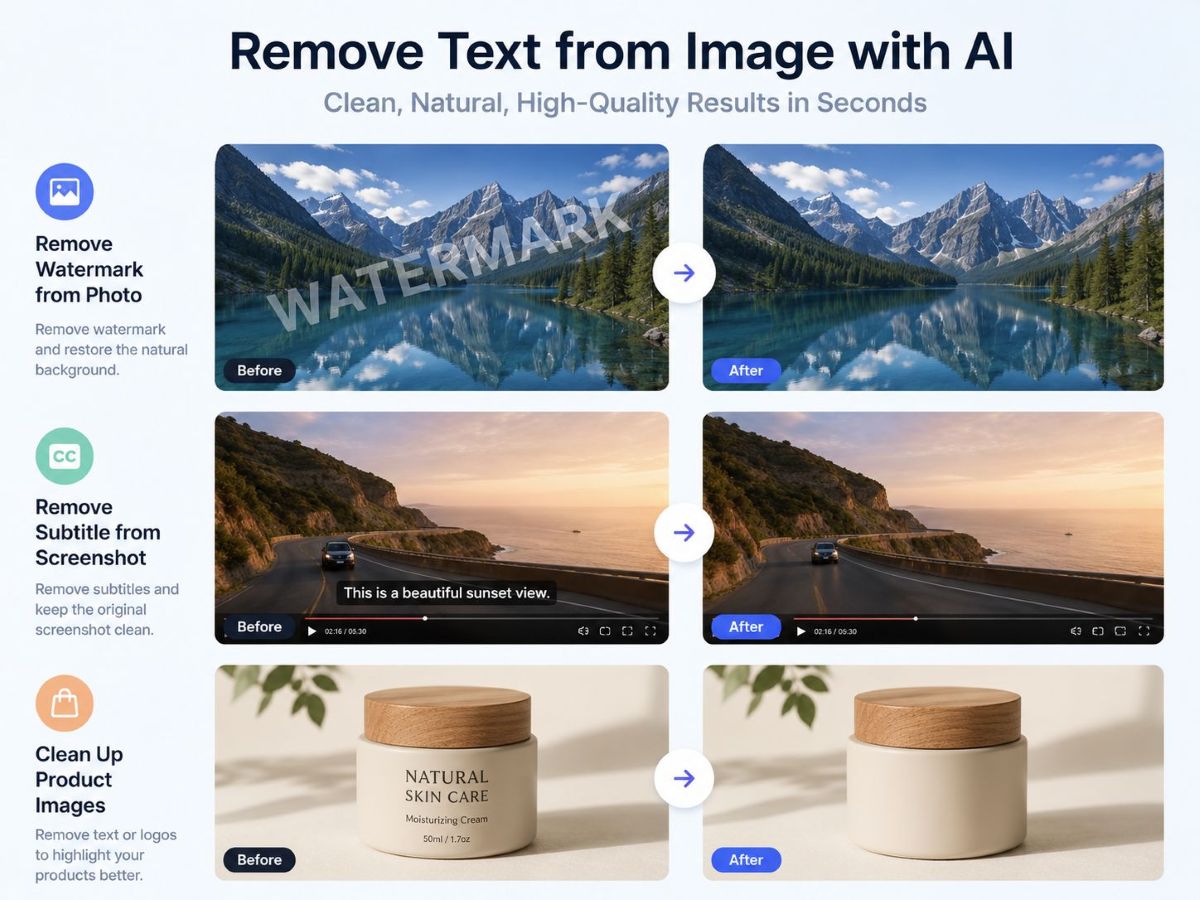
Where AI Text Removal Makes the Biggest Difference
Content Creation
Clean visuals for blogs, thumbnails, and social media.
Marketing & E-commerce
Remove unwanted text to create more professional visuals.
Personal Use
Fix phohos without needing design skills.
Clean Images Without Compromise
The ability to remove text from image quickly and cleanly changes how we work with visuals.
Instead of avoiding images with watermarks or overlays, you can now fix them in seconds—without sacrificing quality.
With AI-powered tools like AIAI.com, text removal is no longer a tedious task. It becomes a simple step in your workflow.

f you’ve been scrolling through TikTok or Instagram Reels lately, you’ve probably noticed a shift. We aren't just looking at Read more
Trying to find an AI video generator that is actually free without holding your creations hostage can feel like a Read more

Introduction When I first started exploring the idea of building a barndominium, I thought choosing a layout would be the Read more
If you’ve been using Google Gemini to generate AI images, you’ve probably noticed the small Gemini logo that appears in Read more


