For over two decades, the Wizarding World has captivated millions. From the moment Harry first stepped onto Platform 9¾, fans have felt an irresistible urge to contribute to this magical universe. We’ve sketched wands in notebooks, written fan fiction, and scrolled through endless galleries of Harry Potter fan art on DeviantArt and Pinterest.
Harry Potter fan art has always been a cornerstone of the fandom. From sketching “Dramione” scenarios to painting breathtaking landscapes of Hogsmeade, fans have kept the magic alive. But not everyone has the artistic skills to match their imagination.
In 2025, that barrier has vanished.
With advanced AI tools like Nano Banana Pro, your wand is now a text prompt. Whether you want to generate book-accurate character portraits that correct the movies’ mistakes, or visualize a “What If” scenario where Harry was sorted into Slytherin, AI empowers you to expand the universe.
Here is the guide to mastering Harry Potter fan art creation.
Why AI is the New “Elder Wand” for Creators
Why are thousands of fans switching to AI generators? It’s not about replacing hand-drawn art; it’s about visualization speed.
- Book Accuracy: Did you know Harry famously has untidy jet-black hair and bright green eyes in the books, unlike the movies? With AI, you can generate “Book-Accurate Harry Potter Fan Art” that stays true to J.K. Rowling’s original descriptions.
- Crossover Styles: Ever wondered what Hogwarts would look like if it was animated by Studio Ghibli? Or a dark, gritty Cyberpunk version of Diagon Alley? AI allows you to apply any art style to the Wizarding World instantly.
- Self-Insertion: The most popular trend in 2025 is the “AI Hogwarts Portrait.” You can upload your own selfie and generate a high-quality oil painting of yourself wearing your House robes (Gryffindor, Slytherin, Ravenclaw, or Hufflepuff).
How to Generate Harry Potter Fan Art with AI
Ready to cast your spell? Using AIAI.com, creating wizarding world art is as easy as saying Lumos
Text-to-Image
- Prompt Formula: [Character Name] + [Book Description Details] + [Setting] + [Art Style]
- Example: “Harry Potter, teenage boy, messy jet-black hair, bright emerald green eyes, round glasses, lightning scar. Wearing oversized muggle clothes. Standing in the Weasley’s garden. Book accurate description, digital painting style, warm lighting.”
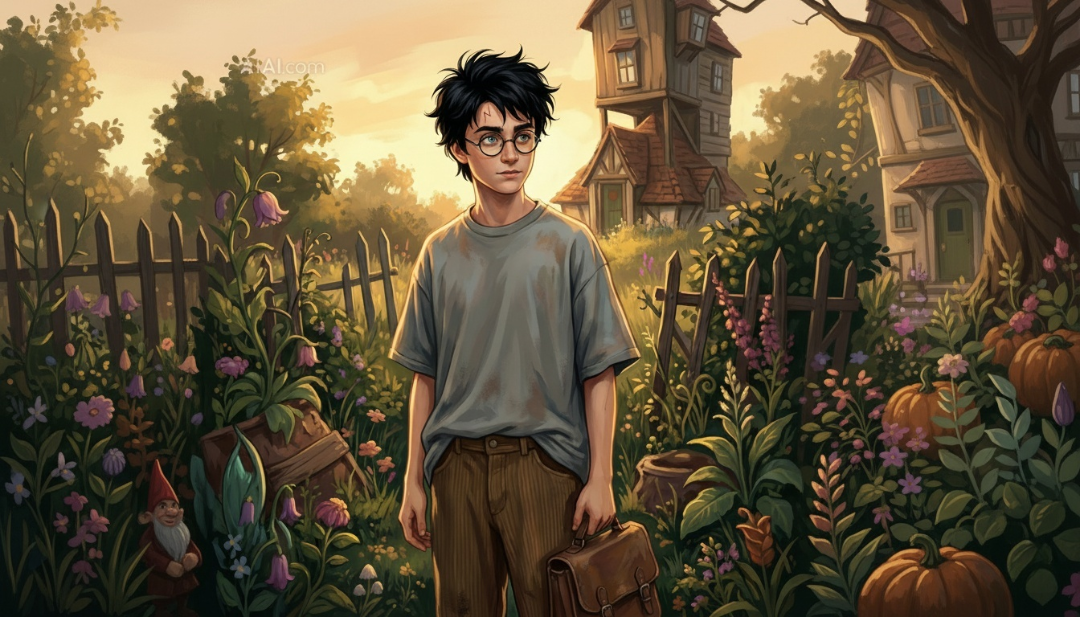
Image-to-Image
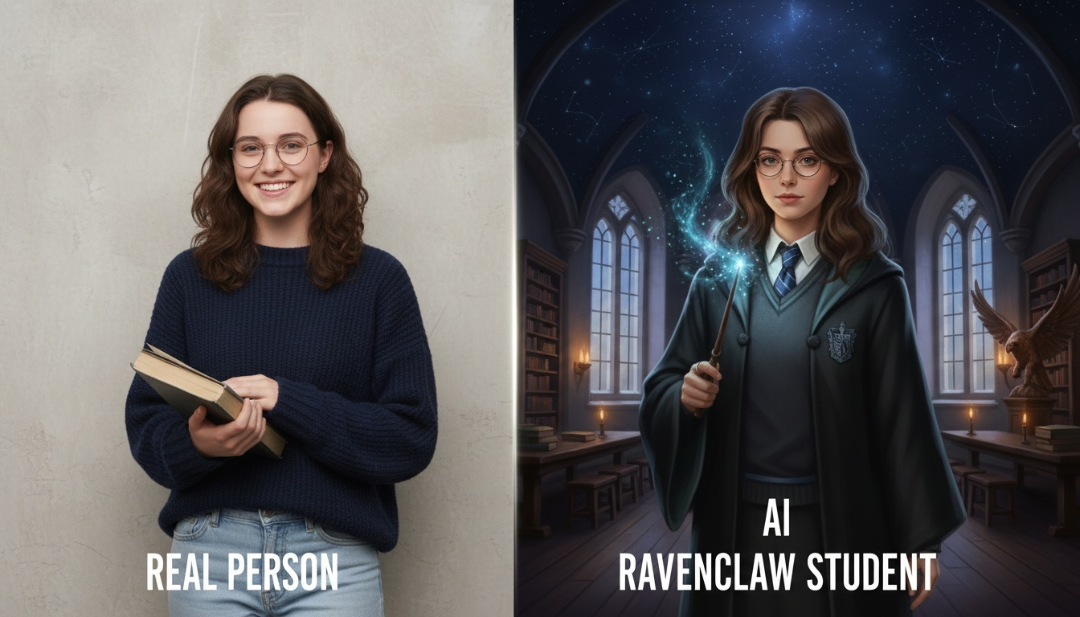
This is the “Holy Grail” for many fans. You can upload a selfie and transform into a student of your favorite house.
- Upload Your Photo: Choose a clear selfie.
- The Prompt: “A student of Ravenclaw house wearing blue and silver robes, holding a wand, standing in the Ravenclaw common room with starry ceiling. Hogwarts Legacy art style, magical aura, photorealistic.”
- Generate: A personalized portrait that looks like it belongs on a Chocolate Frog card!
Tips for Authentic Wizarding World Aesthetics
To make your Harry Potter fan art stand out, pay attention to the details that make the world feel real.
- House Colors: Always specify the house colors in your prompt. Gryffindor: Scarlet and Gold. Slytherin: Emerald Green and Silver. Ravenclaw: Blue and Bronze (or Silver for movie accuracy). Hufflepuff: Yellow and Black.
- Lighting is Key: The Harry Potter films are famous for their specific lighting. Use keywords like “candlelight,” “moonlight,” “magical glow,” or “shadowy” to capture that mood.
- Textures: The wizarding world is old and tactile. Use words like “parchment,” “stone,” “velvet,” “worn wood,” and “bubbling liquid” to give your AI art depth.
Beyond Characters: Visualizing “Lost Scenes”
One of the best uses of AI Harry Potter art is creating scenes that never made it to the screen.
- Peeves the Poltergeist: Finally visualize the mischievous ghost causing chaos in the corridors.
- The Quidditch World Cup: Generate the massive, colorful stadium scenes described in Goblet of Fire.
- The Marauders Era: Create fan art of young James, Sirius, Remus, and Peter during their school days.
Is it time to cancel your Claude subscription? After 72 hours of testing, here is why Google’s Gemini 3 Pro Read more
Looking for a unique romantic gift? Learn how to use an AI kissing video generator to turn your favorite couple Read more
Old videos looking blurry on modern screens? I tested an AI video upscaler to enhance video quality up to 4K Read more
AI Black and White Art Portrait instantly convert your portraits into stunning black and white art using Nano Banana Pro's Read more


