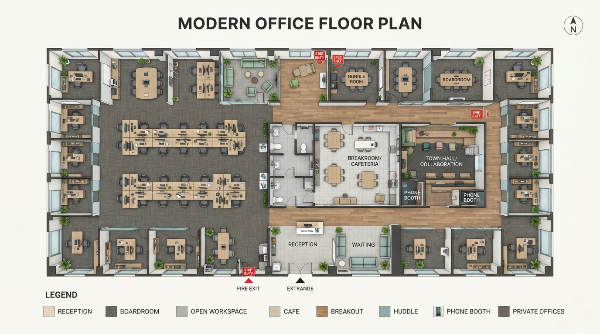
Creating CAD drawings has always required patience, technical skills, and familiarity with professional design software. While tools like traditional CAD programs are powerful, they can feel overwhelming when you simply want to turn an idea into a visual concept quickly.

An AI CAD Drawing Generator Tool offers a simpler way to explore designs. By using text prompts, sketches, or images, AI can help create CAD-style drawings, technical concepts, and early design references without starting everything from scratch.
I tested several AI CAD tools to see which ones are actually useful for different workflows, from generating designs with text to converting sketches and creating blueprint-style concepts. In this guide, I will share the tools that stand out and explain which type of user each one is best suited for.
Best AI CAD Drawing Generator Tools at a Glance
Before looking at each tool in detail, here is a quick comparison based on usability, input methods, and how well each platform fits common AI CAD workflows.
| Tool | Text to CAD | Sketch to CAD | Technical Drawing | Ease of Use | Overall Rating |
|---|---|---|---|---|---|
AIAI.com AI CAD Drawing Generator | ⭐⭐⭐⭐⭐ | ⭐⭐⭐⭐⭐ | ⭐⭐⭐⭐⭐ | ⭐⭐⭐⭐⭐ | ⭐⭐⭐⭐⭐ |
| DrawCAD | ⭐⭐⭐⭐⭐ | ⭐⭐⭐⭐ | ⭐⭐⭐⭐ | ⭐⭐⭐⭐⭐ | ⭐⭐⭐⭐ |
| Zoo.dev | ⭐⭐⭐⭐ | ⭐⭐⭐ | ⭐⭐⭐⭐ | ⭐⭐⭐ | ⭐⭐⭐⭐ |
| AdamCAD | ⭐⭐⭐⭐ | ⭐⭐⭐ | ⭐⭐⭐⭐ | ⭐⭐⭐ | ⭐⭐⭐⭐ |
| OpenArt AI CAD Drawing Generator | ⭐⭐⭐ | ⭐⭐⭐⭐ | ⭐⭐⭐ | ⭐⭐⭐⭐⭐ | ⭐⭐⭐⭐ |
| Vondy AI CAD Generator | ⭐⭐⭐ | ⭐⭐⭐ | ⭐⭐⭐ | ⭐⭐⭐⭐⭐ | ⭐⭐⭐ |
What Can an AI CAD Drawing Generator Tool Do for Your Design Workflow?

When exploring AI design tools, I noticed that many beginners do not struggle with coming up with ideas. The harder part is turning those ideas into something visual that others can understand.
This is where an AI CAD Drawing Generator Tool becomes useful. Instead of opening complicated software and building every element manually, users can start with a simple description, rough sketch, or reference image and create a design concept much faster.
Common uses include:
- Creating early product design concepts
- Generating CAD-style visuals from text descriptions
- Turning rough sketches into cleaner design references
- Creating technical drawing concepts
- Exploring blueprint-style layouts for architecture ideas
It is important to understand that AI CAD tools are not designed to completely replace professional CAD software. For manufacturing, engineering validation, and precise production drawings, traditional CAD workflows are still essential.
Instead, AI works best as a creative assistant. It helps users move from an idea to a visual concept before spending more time on detailed development.
How an AI CAD Drawing Generator Tool Turn Ideas into CAD Designs
Most AI CAD workflows are built around a few simple input methods. The process is much more approachable compared with creating every detail manually.

1. Generate Designs from Text Prompts
A major trend in AI design is the AI Text to CAD Generator workflow.
Users can describe what they want in natural language, and AI can create a CAD-style concept based on the description.
For example, instead of manually modeling a product from the beginning, you can describe:
- A modern chair with a curved structure
- A mechanical component with specific features
- A simple architectural layout
This approach is especially helpful during brainstorming because it allows designers to explore multiple ideas quickly.
2. Convert Sketches into Digital Design Concepts
Many designers still prefer starting with pen and paper. A sketch often captures an idea faster than working directly inside design software.
An AI Sketch to CAD Generator helps bridge the gap between rough ideas and digital design concepts.
Users can upload simple sketches and use AI to create cleaner CAD-style references, making it easier to continue refining the idea.
This workflow can be useful for:
- Product designers
- Students learning design
- Creative teams developing concepts
- Anyone who prefers visual thinking
3. Create Technical Drawings and Blueprint Concepts
For users who need more structured visuals, an AI Technical Drawing Generator can help create clearer design references.
AI-generated technical drawings can support:
- Design presentations
- Early engineering discussions
- Concept reviews
- Architecture planning
Similarly, an AI Blueprint Generator can help users quickly explore layout ideas and visualize possible designs before moving into detailed planning.
6 Best AI CAD Drawing Generator Tools to Create Technical Drawings, Blueprints, and More
1. AIAI.com AI CAD Drawing Generator — Best Overall Choice for AI-Powered CAD Creation
AIAI.com AI CAD Drawing Generator is the tool I would recommend first for users who want a simple way to explore AI-assisted CAD creation.
What stood out to me during testing was how easy it is to start creating without needing advanced CAD knowledge. Instead of spending time learning complicated menus and functions, users can focus more on describing the idea they want to explore.
AIAI.com supports different creative workflows, including text-based generation, sketch conversion, and design visualization.
AI Text to CAD Generation
With text input, users can describe an object, product, or design idea and generate a CAD-style concept based on that description.
This is useful when you already have a clear idea but want to quickly visualize different possibilities before creating a detailed model.
AI Sketch to CAD Generation
For users who prefer drawing ideas first, AIAI.com provides a more visual workflow.
A rough sketch can become a cleaner design reference, helping creators move from an initial idea toward a more structured concept.
AI Technical Drawing Generation
Another useful application is creating technical-style design visuals.
These generated drawings can help explain concepts during presentations, discussions, or early planning stages.
AI Blueprint Generation
For architecture-related concepts, AIAI.com can also help users create blueprint-style visual references.
This can be useful for exploring:
- Floor plan concepts
- Space layouts
- Early architectural ideas
One thing I like about this approach is that it lowers the barrier for people who have design ideas but do not want to spend hours learning complex CAD software before seeing results.
Pros
- Simple workflow for beginners
- Supports text, sketch, and image-based inputs
- Useful for early-stage design exploration
- Helps visualize ideas faster
Cons
- Better suited for concept creation and visualization rather than replacing professional CAD production workflows
Best for: Beginners, designers, creators, and users who want to quickly transform ideas into CAD-style concepts.
2. DrawCAD — Best AI Tool for Turning Text and Sketches into CAD Drawings
DrawCAD is one of the AI tools that focuses directly on the text-to-CAD workflow. It is designed for users who want to quickly turn ideas into CAD-style visuals without going through a traditional modeling process.
The biggest advantage of DrawCAD is its straightforward approach. Users can describe a design idea with text or start from a sketch, making it easier to explore different concepts during the early design stage.
For creators who are experimenting with AI-assisted design, DrawCAD provides a simple way to test ideas and generate visual references quickly.
Best for: Users who want fast text-based and sketch-based CAD concept generation.
3. Zoo.dev — Best AI CAD Generator for Engineering Workflows
Zoo.dev takes a more engineering-focused approach compared with many visual AI design tools.
Instead of mainly focusing on concept images, it explores how AI can support CAD workflows and help users create designs through more structured processes.
This makes it more suitable for engineers, developers, and technical users who already understand CAD concepts and want to experiment with AI-assisted modeling.
Best for: Engineers and technical users looking for AI support during CAD workflows.
4. AdamCAD — Best for AI-Assisted 3D CAD Modeling
AdamCAD focuses more on AI-powered 3D CAD modeling and design exploration.
For product designers who need to visualize three-dimensional concepts before detailed development, AI-assisted modeling can help speed up the brainstorming stage.
It is a useful option for users who want to explore product ideas, shapes, and 3D concepts with AI support.
Best for: Product designers interested in AI-assisted 3D CAD workflows.
5. OpenArt — Best for AI-Generated CAD Concepts and Visual Designs
OpenArt is better known as an AI image generation platform, but it can also be useful for creating CAD-style concepts and visual design references.
I found it more suitable for the creative side of design rather than detailed CAD workflows. For example, architects, designers, and creators can use it to explore different visual directions before moving into a more technical design process.
It works well when the goal is inspiration, concept development, or presenting early ideas visually.
Best for: Designers who need AI-generated CAD concepts and creative references.
6. Vondy — Best for Simple and Fast AI CAD Generation
Vondy provides a simple way for users to experiment with AI-generated designs without a complicated setup.
It is not intended to replace professional CAD software, but it can be useful for beginners who want to quickly explore what AI design tools can do.
For casual users or people testing AI CAD workflows for the first time, its simple interface can be a good starting point.
Best for: Beginners who want to try AI CAD generation quickly.
How to Choose the Right AI CAD Drawing Generator Tool for Your Needs?

Choosing the right AI CAD tool depends on what you want to achieve. Different users have different workflows, so the “best” option is not always the same for everyone.
For beginners who want an easy starting point
If you are new to CAD or simply want to turn ideas into visual concepts quickly, AIAI.com is a strong choice. Its simple input methods make it easier to start creating without spending a long time learning complicated software.
For text-based CAD creation
If your main goal is creating designs from written descriptions, tools focused on text-to-CAD workflows, such as DrawCAD and Zoo.dev, may fit better.
For 3D product design exploration
Users working on product concepts may prefer tools like AdamCAD, especially when exploring three-dimensional design ideas.
For visual inspiration and concept development
If you are more focused on creative exploration, mood boards, or early design ideas, OpenArt can help generate visual references before moving into detailed CAD work.
AI CAD Drawing Generator Tool vs Traditional CAD Software: What’s the Difference?
AI CAD tools and traditional CAD software are designed for different stages of the design process.
| AI CAD Generator | Traditional CAD Software | |
|---|---|---|
| Learning curve | Easier for beginners | Requires more training and experience |
| Idea exploration | Fast concept generation | Usually requires manual creation |
| Design visualization | Helpful for early concepts | More precise and controlled |
| Production-ready design | Often needs further refinement | Better suited for manufacturing workflows |
From my experience, the best way to use AI is not to think of it as a replacement for CAD software. Instead, it works best as a shortcut during the early creative stage.
You can use AI to explore ideas, generate references, and communicate concepts faster, then continue refining the final design with professional CAD tools when precision is required.
Frequently Asked Questions About AI CAD Drawing Generator Tools
What is an AI CAD Drawing Generator Tool?
An AI CAD Drawing Generator Tool is a tool that uses artificial intelligence to create CAD-style drawings from text prompts, sketches, or images. It helps users visualize design ideas faster without manually creating every element from the beginning.
Can AI generate CAD drawings from text?
Yes. An AI Text to CAD Generator allows users to describe an object, product, or design concept using natural language and generate a CAD-style visual based on the description.
Can AI convert sketches into CAD drawings?
Yes. An AI Sketch to CAD Generator can help transform rough sketches into cleaner digital design references, making it easier to continue the design process.
What is an AI Technical Drawing Generator?
An AI Technical Drawing Generator uses artificial intelligence to create technical-style drawing concepts that can help users communicate ideas, review designs, and plan projects.
Can AI create blueprints?
Yes. An AI Blueprint Generator can help users create blueprint-style layouts and explore architectural or design concepts during the planning stage.
Final Thoughts: Find the Best AI CAD Drawing Generator Tool for Your Design Goals
AI is making design exploration faster and more accessible. Instead of spending hours creating an initial concept manually, users can now start with a simple idea, sketch, or description and quickly turn it into a visual reference.
For beginners, designers, and creators who want an easier way to explore CAD concepts,
AIAI.com AI CAD Drawing Generator is a practical option to try.
Whether you want to generate designs from text, convert sketches, create technical drawing concepts, or explore blueprint ideas, AI CAD tools can help shorten the distance between imagination and visualization.
The future of design is likely not about choosing between AI and traditional CAD. Instead, the most effective workflow will combine both: using AI to explore ideas faster and professional tools to bring those ideas into precise final designs.
Need a last-minute Valentine’s gift that isn't generic? Learn how to use AI to create custom love coupons and cards Read more
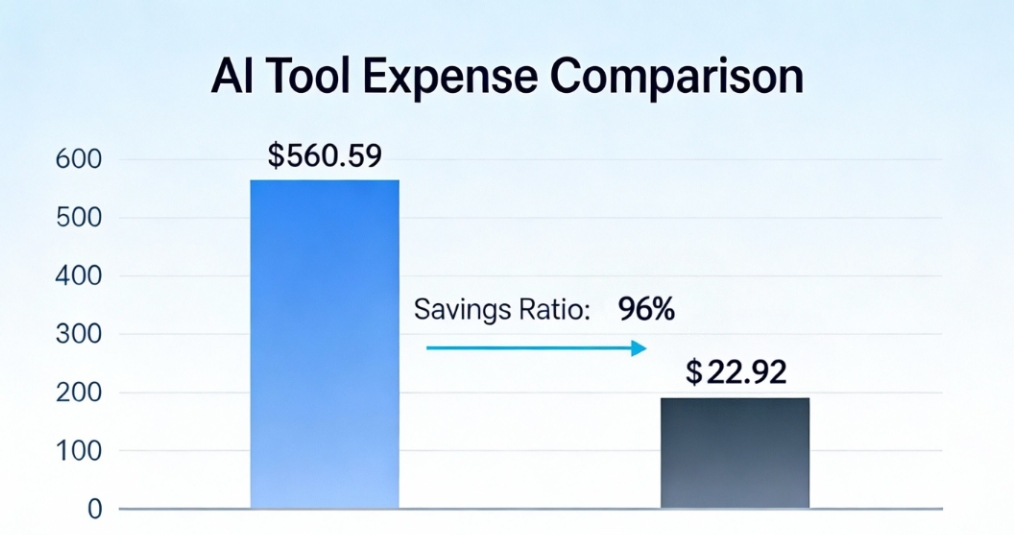
How I Reduced AI Costs by 96% with All-in-One AI Tool This article shares a real case study from one Read more

As a hobbyist artist and social media content creator, I’ve always loved the clean, minimalist look of line drawings—but I’m Read more

Learn the best Veo Watermark Remover methods for 2026. Compare AI tools, cropping, and editing techniques to remove Veo watermarks Read more