AI Christmas Cards: How to Make Them with Nano Banana Pro on AIAI.com
Let’s be honest: walking into the card aisle at Target or CVS this time of year is a total budget shock. Paying $7.99 for a generic card that thousands of other people are buying? No thanks.
This year, it’s time to upgrade. Instead of overpaying for paper, you can create stunning, 100% unique AI Christmas cards in seconds.
I know what you’re thinking: ‘Don’t I need a crazy expensive gaming PC for that?’ Not anymore.
In this guide, I’m going to show you how to unlock the power of Nano Banana Pro. This state-of-the-art AI—built on Google’s advanced Gemini 3 Pro architecture and famous for its flawless text rendering—is ready for you on AIAI.com. You can access it directly in your browser to create professional holiday designs instantly. No complex setup, no stress—just pure creativity.
Why Make Your Own AI Christmas Cards with Nano Banana Pro?
Tired of boring, overpriced store-bought cards? Me too. Going the DIY AI route is the perfect fix. It’s unique, affordable, and fun.
But why pick Nano Banana Pro on AIAI.com over big names like Midjourney?
Simple. For creating Christmas cards (especially ones with text), our platform offers some massive advantages that general-purpose AI models just can’t match:
- Zero Setup Required: You don’t need to install Python, deal with GitHub, or buy a customized PC. AIAI.com runs the heavy lifting in the cloud. You just visit the site, and it works.
- The “Text” Advantage: The Nano Banana Pro model is specifically optimized to handle text better than older models. If you want a card that says “Merry Christmas” clearly (instead of alien gibberish), this is the model to use.
- Fast & Accessible: Our platform is ready when you are. Simply go to AIAI.com on your laptop, tablet, or phone to design your card whenever inspiration strikes—whether you have five minutes at home or are waiting in line for a latte.
Step 1: Getting Started on AIAI.com
Ready to design? Let’s get your workspace ready.
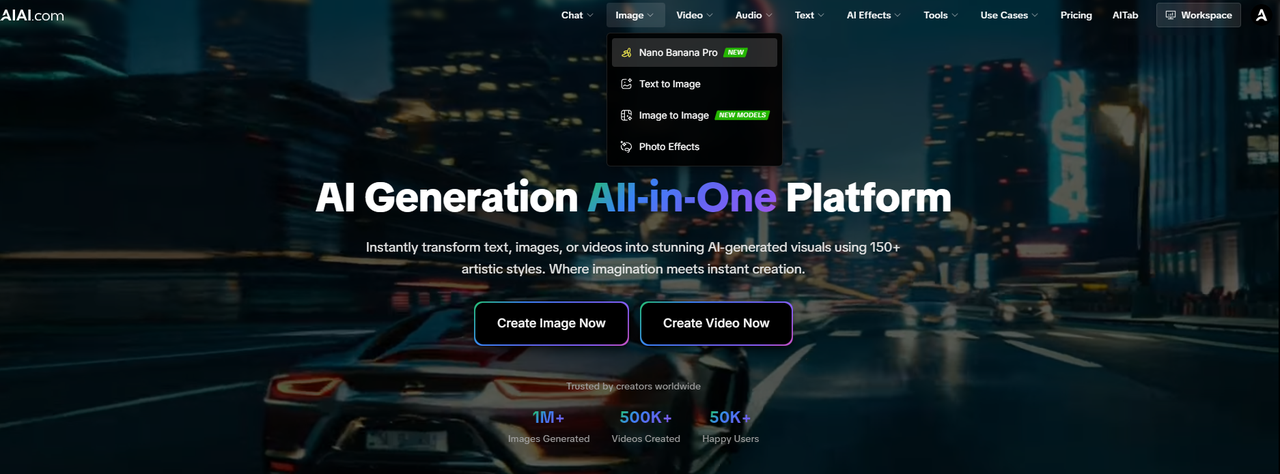
- Go to the Website: Head over to AIAI.com
- Find the Model: In the model search bar or the featured section, look for “Nano Banana Pro”.
- Select It: Click to load the model interface. You should see a clean workspace where you can enter your prompt.
Step 2: Setting the Right Dimensions
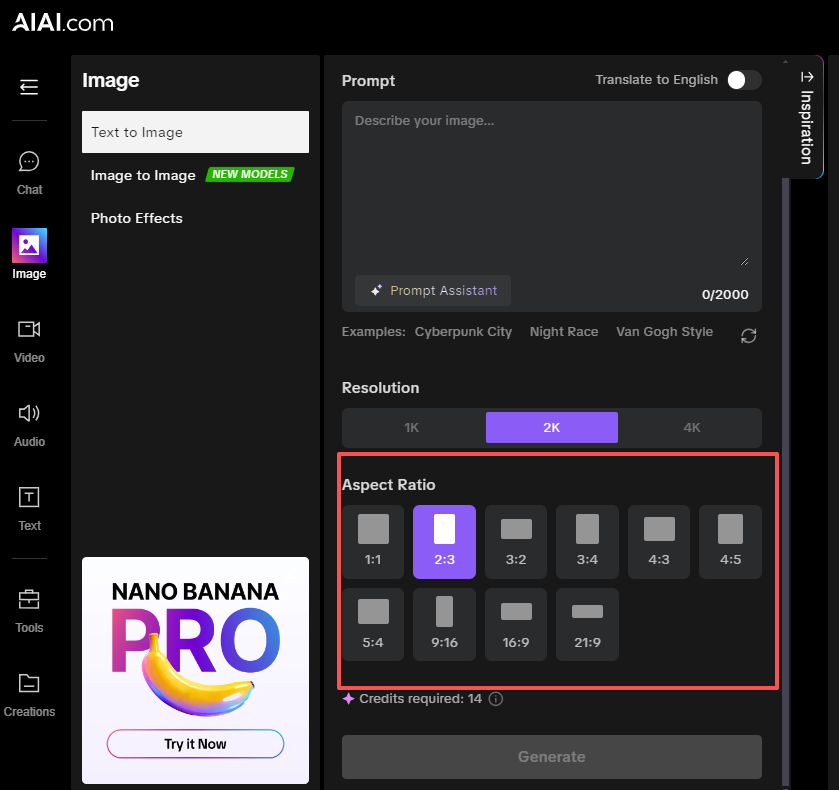
Before you type your first word, we need to make sure your card fits in an envelope.
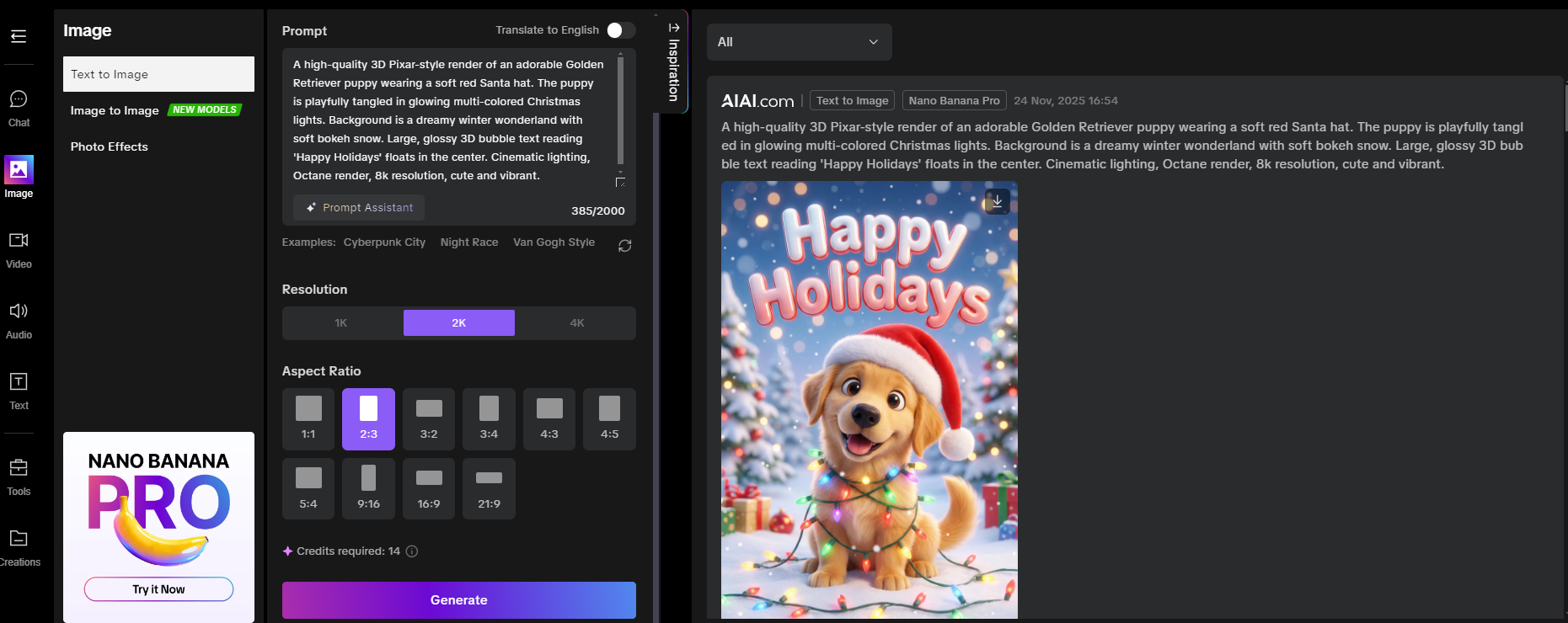
- For a Classic Vertical Card: Look for the Aspect Ratio settings on the sidebar and select 2:3. This is perfect for printing on standard 4×6″ photo paper.
- For a Modern Horizontal Card: Select 3:2.
Pro Tip: AIAI.com usually has these presets ready for you. Don’t use 1:1 (Square) unless you plan to post it on Instagram!
Step 3: Write Your AI Image Prompts (With Templates)
Now for the fun part. Since we are using Nano Banana Pro, we can get creative with text. Here are three “recipes” you can copy directly into the prompt box on AIAI.com.
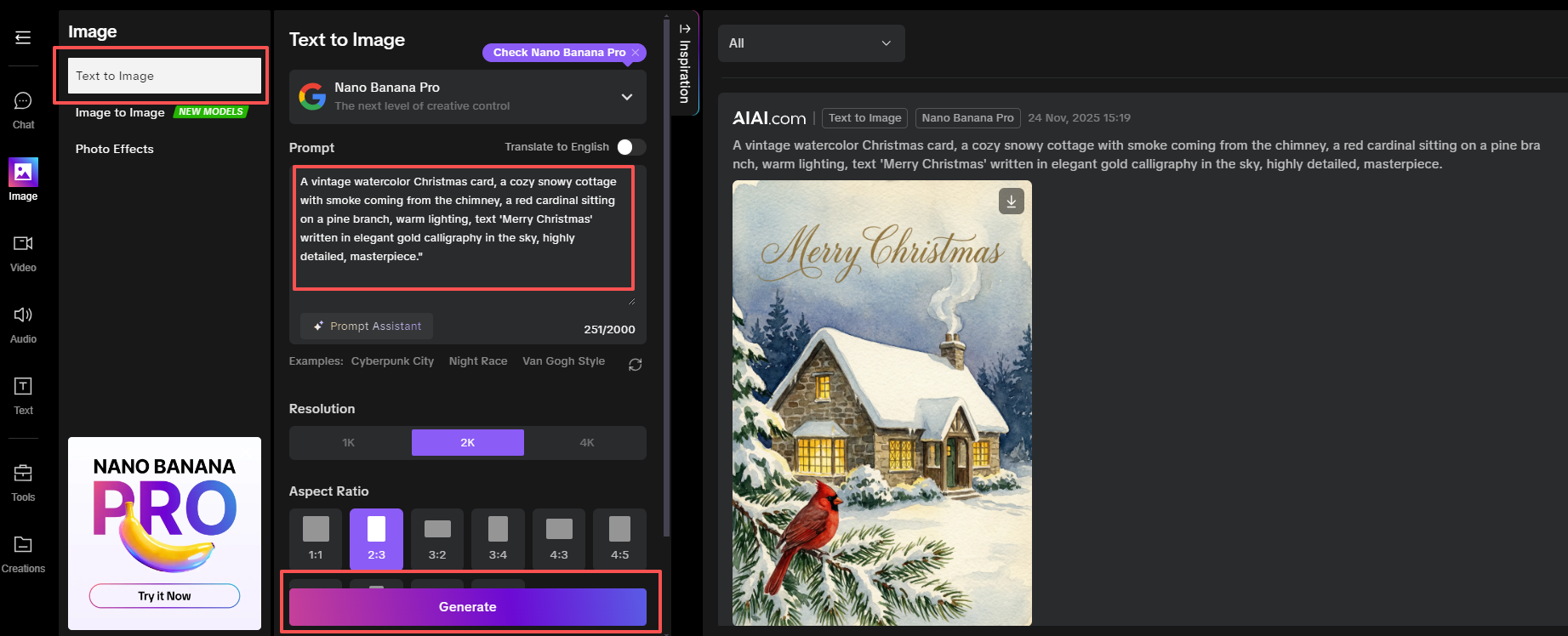
🎄 Style 1: The Traditional Warmth
Best for: Grandparents and traditional relatives.
Prompt: “A vintage watercolor Christmas card, a cozy snowy cottage with smoke coming from the chimney, a red cardinal sitting on a pine branch, warm lighting, text ‘Merry Christmas’ written in elegant gold calligraphy in the sky, highly detailed, masterpiece.”
❄️ Style 2: The Modern Minimalist
Best for: Friends and colleagues.
Prompt: “Minimalist flat vector art, a white reindeer silhouette on a sage green background, falling snow, modern bold typography text ‘JOY’ in the center, clean lines, high resolution.”

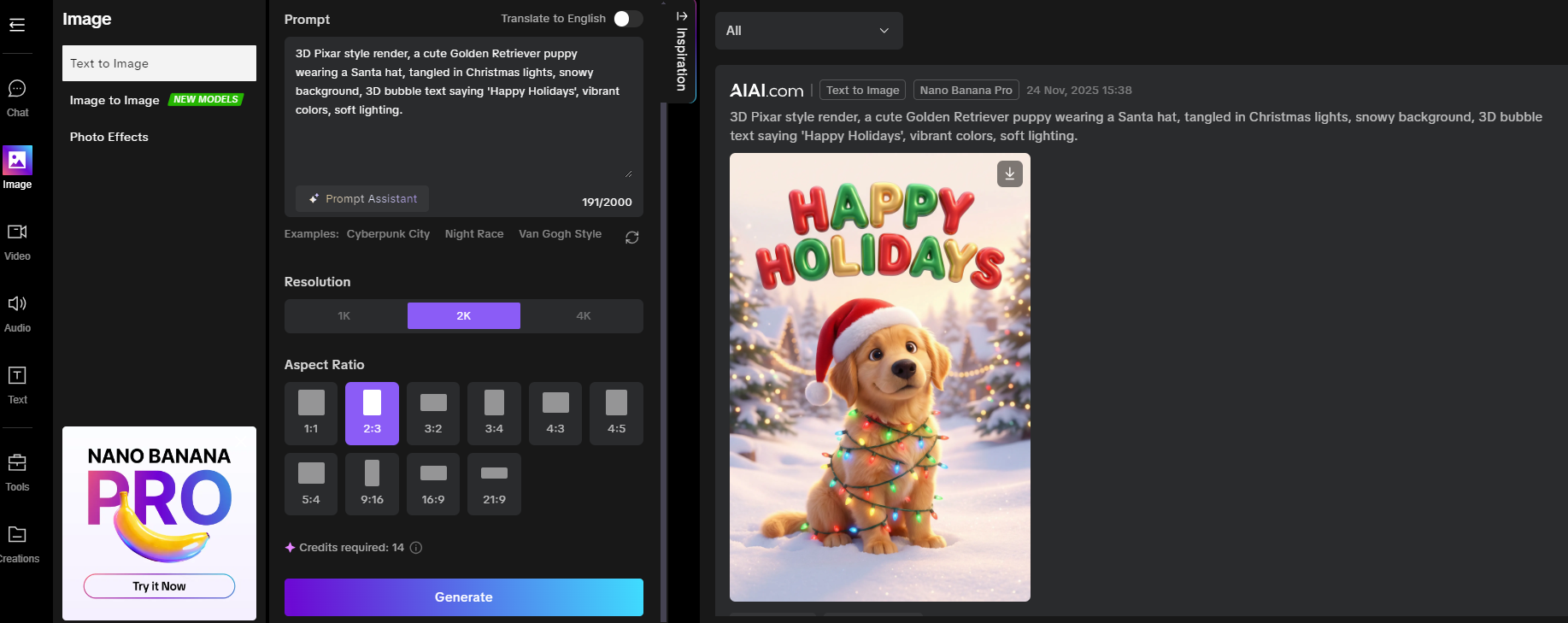
🐶 Style 3: The Cute Factor
Best for: Pet lovers.
Prompt: “3D Pixar style render, a cute Golden Retriever puppy wearing a Santa hat, tangled in Christmas lights, snowy background, 3D bubble text saying ‘Happy Holidays’, vibrant colors, soft lighting.”
Step 4: Refining and Generating
Click the “Generate” button on AIAI.com.
Within seconds, Nano Banana Pro will produce your image.
Did the text look weird? Sometimes even the best AI needs a second try. Just hit “Generate” again.
Want to change the vibe? Add words like “Cinematic lighting” or “Pastel colors” to your prompt.
Because you are using AIAI.com, the generation speed should be fast enough to try 5 or 6 variations in just a minute.
Step 5: Download and Print
Once you have the perfect image:
Click the Download or Save button on the AIAI.com interface.
Where to print?
Budget: Upload to Walgreens Photo or CVS (Same-day pickup, usually under $0.40/print).
DIY: Print at home on Cardstock Paper.
Final Thoughts
You don’t need to be a graphic designer to send amazing cards this year. By combining the power of Nano Banana Pro with the ease of AIAI.com, you’ve got a professional design studio right in your web browser.
Ready to start? 👉 Click here to try Nano Banana Pro on AIAI.com now and make your first card for free!
Don’t forget to tag us if you post your creations on social media!
OpenAI has released GPT-5.2, shifting from chatbot to "Agent." Discover the new Instant, Thinking, and Pro models and how they Read more

Let’s be honest: in the crowded world of AI generation in 2026, if Midjourney wins on texture and Sora wins Read more

If you’ve been using Meta’s latest generative features on Instagram or WhatsApp, you’ve likely encountered that frustrating "Imagined with AI" Read more
Need a logo fast but don’t have design skills? An AI Logo Generator can help you create multiple professional logo Read more


