If you’ve ever snapped a perfect moment only to discover later that the lighting was awful, the background was distracting, or the whole shot just looked… off, you’re not alone. Most of us don’t have the time (or patience) to learn advanced editing tools, and honestly, we shouldn’t have to. That’s where Nano Banana Pro AI quietly steps in. At a time when everyone wants their photos to look natural, clean, and effortless, Nano Banana Pro delivers exactly that.
What Makes Nano Banana Pro AI Stand Out?
- One-Sentence Fixes for Real-Life Photo Problems
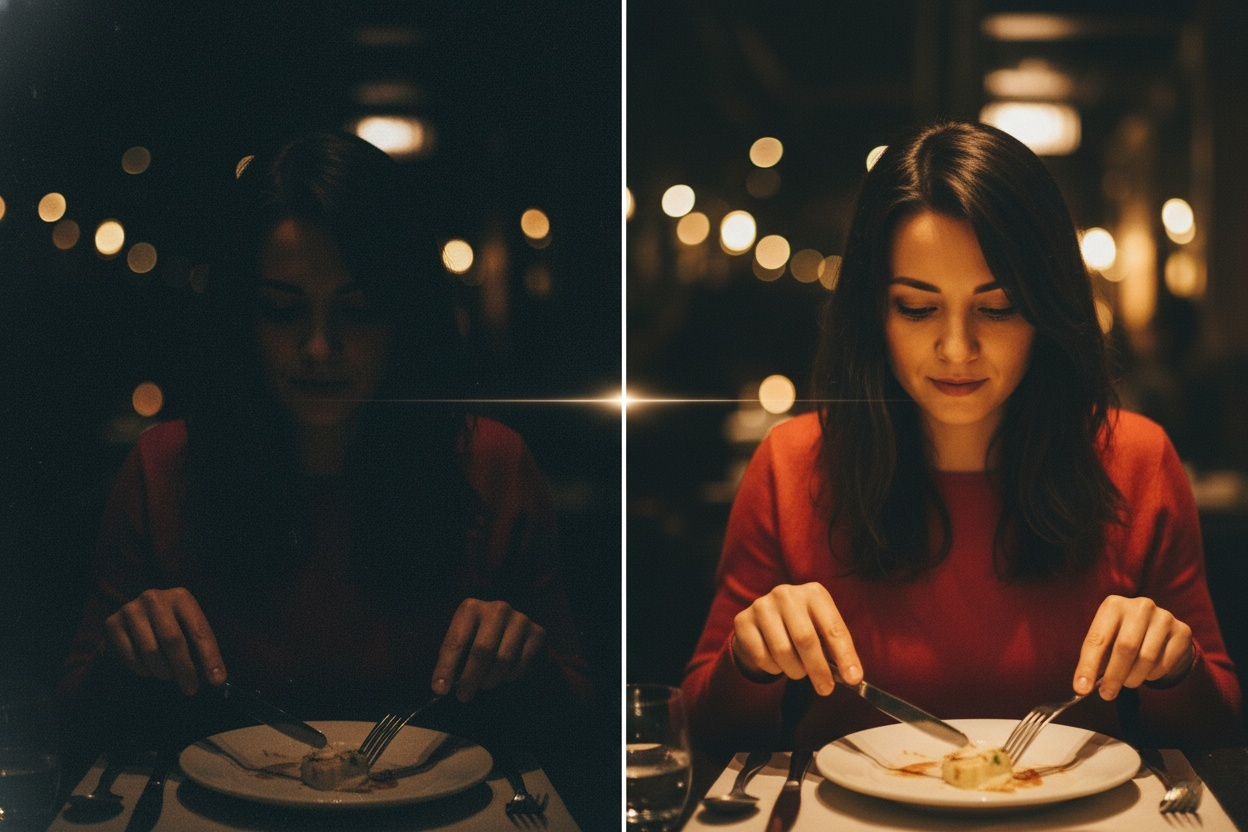
Instead of dragging sliders and guessing what “exposure” or “curves” even mean, Nano Banana Pro AI lets you type a simple prompt like:
“Brighten the photo, soften the lighting, and blur the background to highlight the person in the foreground.”
That’s it.
Your dim dinner photo suddenly looks like it was taken under warm candlelight. Your grainy group shot becomes crisp, soft-lit, and Instagram-ready.
- Perfect for Everyday “Oops” Moments
We all have them — the birthday dinner in a nearly pitch-black restaurant, the backlit selfie that hides half your face, the cute pet photo destroyed by messy backgrounds.
Nano Banana Pro AI is built for these exact moments, it simply helps them look the way you remember them.
- Subtle Enhancement, Not Overdone Filters
A lot of AI editors go too far. You ask for brightness, and they give you a spotlight. You want blur, and suddenly the background disappears completely.
Nano Banana Pro is different. Its strength lies in nuance:
Softened shadows. Gentle depth-of-field. More clarity without harshness.
Your photo still looks like your photo — just better.
Try This: A Real Example Prompt That Works Brilliantly
If you want to experience its magic instantly, upload a photo taken in a dim restaurant and use this prompt:
“Increase brightness and softly blur the background to make the foreground person stand out. Make the lighting look like warm candlelight.”
You’ll see how Nano Banana Pro interprets it naturally: no halos, no artificial gloss, no “over-edited” vibe.
ChatGPT-5 Technical Analysis: Core Capabilities and Applications Guide ChatGPT-5 has officially launched after much anticipation and many development iterations. This Read more
If you’ve ever opened a video editor and felt stuck, AI video generators might feel like a shortcut worth trying. Read more
Introduction Creating realistic animated videos used to require advanced editing skills, motion design software, and hours of manual work. For Read more
As a hobbyist artist and social media content creator, I’ve always loved the clean, minimalist look of line drawings—but I’m Read more


