The Freedom to Zoom, Crop, and Create
In the world of digital photography and design, resolution is often the invisible wall that stops creativity. How many times have you taken a wide shot, only to realize that the real story was happening in the background? You try to crop in to isolate that perfect moment, but the image instantly becomes jagged and unusable.
Or perhaps you are exploring the world of AI-generated art (like Midjourney or Stable Diffusion), creating stunning visuals that are unfortunately stuck at a small 1024×1024 resolution—too small for a poster or a desktop wallpaper.
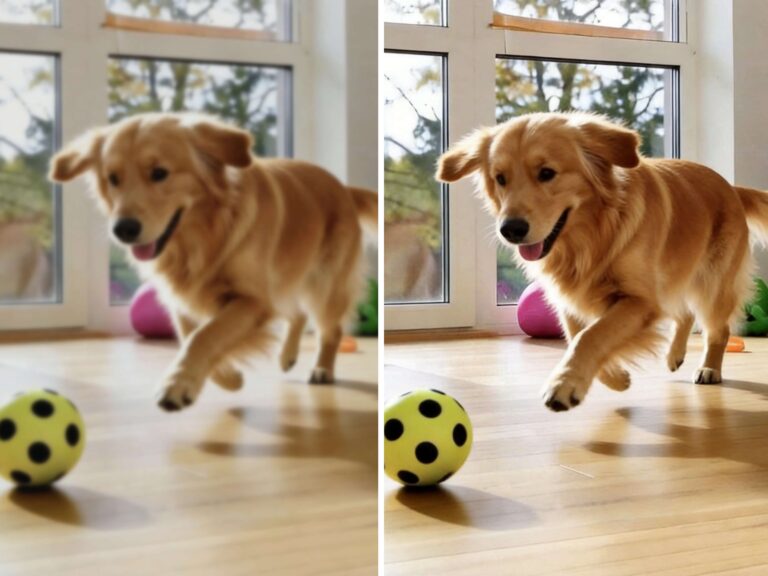
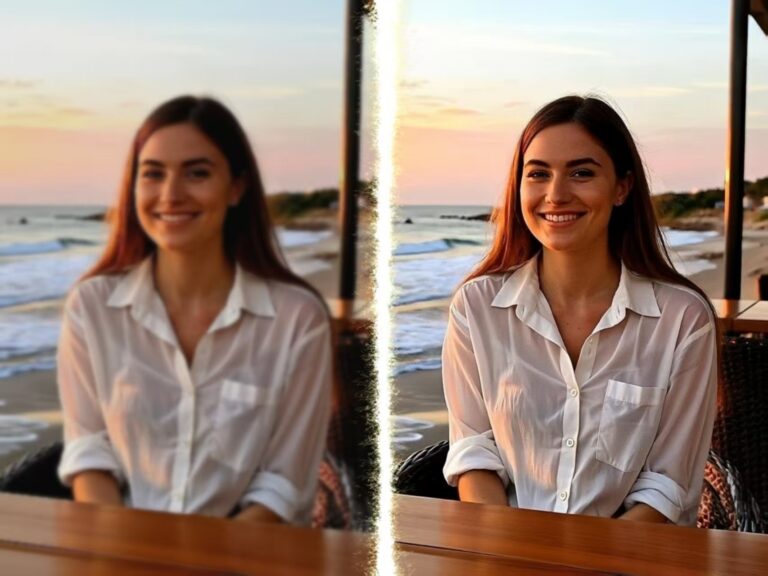
Resolution shouldn’t dictate your artistic vision. With our AI Image Upscaler, you can break through these barriers. We allow you to elevate your pictures to 4K, giving you the power to crop deep into a photo or enlarge digital art while maintaining razor-sharp edges. Experience the most powerful AI image upscaler and turn small, limited files into massive, detailed canvases.
The “Digital Zoom” Revolution: Finding New Photos Within Photos
Standard digital zooming or heavy cropping usually destroys an image. It exposes the “pixels,” turning smooth lines into staircases.
However, our professional image quality upscaler changes the rules. By using deep learning algorithms, our AI doesn’t just enlarge pixels; it understands the geometry of the subject.
This means you can take a wide group photo, crop out just your face for a LinkedIn profile, and use our tool to upscale image resolution back to a high-definition standard. It is like having a high-end telephoto lens after you’ve already taken the shot. The AI predicts and inserts the missing details, making the cropped version look like it was taken as a dedicated close-up.
New Use Cases: Where High Resolution Matters Most
While our previous guide discussed fixing blurry photos, here are specific creative scenarios where an AI upscaler is your best tool:
The AI Artist & Creator
The Scenario: You have generated a beautiful landscape or character using an AI art generator. The composition is perfect, but the file size is too small for a print or a 4K monitor background.
The Solution: Generative AI creates details, but Upscaling AI clarifies them. Use AIAI.com to enhance photos instantly, turning a small generated square into a massive, wall-worthy 4K poster.
The Wildlife and Sports Photographer
The Scenario: You are at a concert or a soccer game, and you capture an amazing action shot—but the subject is far away.
The Solution: Crop the image tightly around the action. Then, run it through our AI Image Upscaler. You transform a distant, messy shot into a crisp, front-row action photo.
The Presentation Guru (Screenshots)
The Scenario: You need to include a graph or data chart in a presentation, but you only have a low-res screenshot. On a big projector screen, the text looks unreadable.
The Solution: Don’t rebuild the chart. Simply upscale the screenshot. Our AI is excellent at sharpening text and geometric lines, making your data look professional on the big screen.
The Stock Photo Editor
The Scenario: You found the perfect free stock photo, but the high-res version requires a paid subscription you don’t have. You are stuck with the small preview file.
The Solution: Take the smaller free version and perform a photo upscale. Our tool adds the necessary density to the image, making it usable for blog posts or website banners.
How to Upscale Image Resolution for Print and Web
Achieving 4K quality is easier than editing a selfie. Follow these steps to use the most powerful AI image upscaler free:
- Upload Your Image: Drag your file (cropped photo, AI art, or screenshot) into the AIAI.com AI Image Upscaler interface.
- Select “4K” or Custom Scale: Choose how large you need the final output. For printing or wallpapers, we recommend the highest setting to elevate your pictures to 4K.
- Enhance and Save: Click the button to start the AI engine. Watch as the blur vanishes and details emerge. Download your new masterpiece.
From Photo Upscale to Professional Image Quality
What makes our tool “professional grade”? It is the ability to distinguish between noise and texture.
- Smart Smoothing: Standard upscalers blur everything. Our AI smooths the noise (grain) but keeps the texture (skin pores, fabric weave, brickwork) sharp.
- Artifact Removal: It cleans up the “JPEG artifacts”—those ugly blocky squares that appear in compressed images.
- True Clarity: It doesn’t just make the file heavy; it makes the visual experience clearer.
Your Vision, Unrestricted
You no longer need a $5,000 camera lens or a subscription to expensive stock sites to get high-resolution imagery. Whether you are cropping a candid moment or blowing up an AI-generated fantasy world, AIAI.com gives you the pixels you need.
Don’t let size hold you back. Enhance photos instantly and see what you’ve been missing.
Old videos looking blurry on modern screens? I tested an AI video upscaler to enhance video quality up to 4K Read more
Stop letting your favorite memories look blurry on modern screens. Learn how to use AI video upscaler to transform low-resolution Read more