With the rise of generative AI, creating stunning videos has never been easier. I recently used Meta AI to generate a fantastic video clip that I knew would go viral on TikTok. The visuals were crisp, the motion was fluid, and the concept was perfect for my audience. However, there was one glaring problem: the Meta AI watermark.
Like any creator, I wanted my content to look professional and native to the platform I was posting on. I needed that watermark gone. Naturally, my first instinct was to turn to Google. I searched for “how to remove video watermarks” and was greeted with dozens of free online tools. I was excited—who doesn’t love a free fix?
But as I soon discovered, “free” often comes with a hidden cost: quality. After frustrating attempts with manual tools that blurred my video or destroyed the resolution, I stumbled upon a professional, paid AI platform. It was a game-changer. It offered automatic detection, zero quality loss, and a fair pricing model.
If you are facing the same dilemma, this article documents my journey from frustration to finding the perfect solution.
Is There a Free Tool to Remove Video Watermarks?
The short answer is: Yes, absolutely.
If you search for “video watermark remover” on Google, you will find millions of results. There are online web-based editors, mobile apps, and open-source software that promise to wipe away logos, text, and timestamps for free.
For simple tasks—like a small, static logo in the corner of a black screen—these tools can work. They usually operate on basic principles like Gaussian blur (smudging the pixels) or simple interpolation (copying nearby pixels to cover the logo). However, when dealing with high-definition AI-generated content where the watermark might be semi-transparent or moving, the definition of “works” becomes subjective.
Top Free Video Watermark Remover Tools Recommended
During my initial search, I tested several popular free options. If you are on a strict budget and the quality isn’t your top priority, these are the ones that appeared most frequently:
- 123Apps (Online Video Cutter): A popular browser-based tool that lets you select an area to blur or crop. It is easy to use but lacks advanced AI inpainting.
- CapCut (or other mobile editors): While primarily an editor, you can sometimes use the “mask” or “sticker” feature to cover watermarks, though this isn’t true removal.
- Media.io (Free Trial Version): This offers a taste of AI removal, but the free version is often heavily restricted in terms of speed, file size, or export resolution.
- Apowersoft Online Watermark Remover: A well-known utility tool. It allows you to draw a box around the watermark.
While these tools are accessible, I found myself hitting a wall with every single one of them when it came to my Meta AI video. Like this one, ezremove.ai, it says my video resolution is too high.

Why I Chose a Paid Video Watermark Remover Tool
Why did I abandon the free tools? It wasn’t because I wanted to spend money; it was because the free results were unusable for a professional TikTok account.
Here were the deal-breakers I encountered with free software:
- The “Blurry Box” Effect: Most free tools require you to manually draw a rectangle around the watermark. The tool then blurs that square. The result looks like a censored spot on your video, which is arguably more distracting than the watermark itself.
- Destructive Compression: I uploaded a 1080p or 4K video, but after processing, the tool allowed me to download only a 720p or highly compressed version. The details were lost, and the colors looked washed out.
- Inability to Handle Moving Watermarks: Meta AI and other generative tools sometimes use dynamic watermarks that shift position or change opacity. Free tools generally require a static position. If the camera pans and the background changes, the “blur box” ruins the new background.
- Manual Labor: I had to frame-by-frame adjust settings or guess where the watermark started and ended. It was time-consuming and frustrating.
I realized that to maintain the viral potential of my video, I couldn’t sacrifice visual fidelity. That is when I found a specific paid AI platform.
The Advantages of Paid AI Watermark Removers
The paid tool I found utilizes advanced Computer Vision and Deep Learning specifically trained for video inpainting. Unlike simple blurring, this technology analyzes the pixels surrounding the watermark and temporally tracks the movement in the video to reconstruct the background behind the text.
Here are the distinct advantages I experienced:
- Automatic Detection: I didn’t have to draw any boxes. The AI automatically detected the watermark, even complex ones.
- Lossless Quality: The most important factor for me was that the platform did not compress my video. The output file retained the original resolution, bitrate, and color grading.
- Moving Watermark Support: It tracked the watermark’s movement perfectly.
- Clean Inpainting: Instead of a blur, it filled in the texture. If the watermark was over a tree, it reconstructed the leaves. If it was over a face, it reconstructed the skin texture.
Beyond Meta AI: A Universal Solution for Veo 3, TikTok, and More
While my initial goal was to fix my Meta AI clip, I quickly realized this tool is not a “one-trick pony.” The AI model isn’t just programmed for one specific logo; it is designed to identify and remove foreign overlay elements from any video source.
This versatility makes it an essential all-in-one tool for creators. I tested it on several other platforms with equal success:
- Google Veo 3: As Google rolls out its new high-end video generation models like Veo, they come with distinct digital watermarks. This tool handles the complex, semi-transparent overlays of Veo 3 just as easily as Meta’s.
- TikTok & Shorts: One of the biggest pain points for creators is the “bouncing” watermark when downloading your own videos from TikTok to repost on Instagram Reels. This tool tracks the moving logo perfectly, erasing it without leaving that ghostly blur trace.
- Other AI Generators: Whether you are using Runway Gen-2/Gen-3, Pika Labs, or Sora, the tool adapts to the unique watermark styles of each platform.
- Hardcoded Subtitles: It can even remove hardcoded subtitles or timestamps from old footage, allowing you to repurpose vintage clips.
How to Use This Video Watermark Remover: A Step-by-Step Guide
For those interested in trying the specific tool I used (or similar high-end AI platforms), the process is designed to be frictionless. Here is how it generally works:
- Open the Website: watermarkremover.aiai.com
- Register and Login: Sign up using your email or Google account.
- Claim Free Trial Credits: Most reputable paid tools act in good faith. This specific platform gifts you 20 credits immediately upon registration so you can test the capability before spending a dime.
- Upload Your Video: Drag and drop your Meta AI video into the upload zone.
- Wait for AI Generation: The meta ai watermark remover analyzes and processes the video. This usually takes a few minutes depending on the file size.
- Review and Purchase: You can preview the result. If you are satisfied with the clean removal, you can purchase the necessary credits (if your free ones ran out) and download the full-resolution video.

Understanding the Pricing Structure of Meta AI Watermark Remover
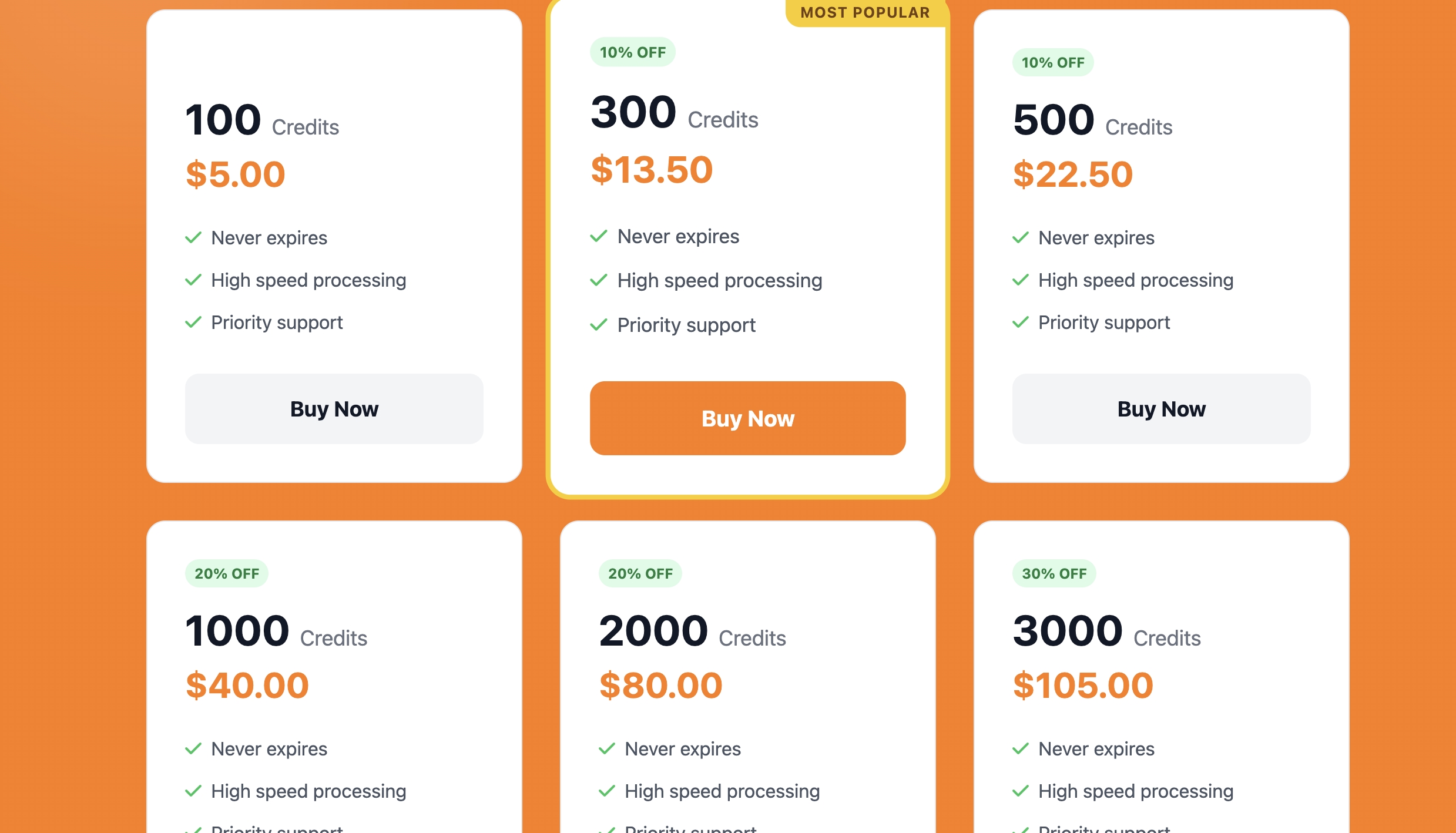
One of the reasons I recommend this specific platform is its transparency and “pay-as-you-go” flexibility. You don’t need to sign up for a massive monthly subscription if you only have a few videos to clean.
The Base Package:
- Price: $5.00 USD
- Credits Received: 100 Credits
How Credits Are Deducted: The cost is calculated based on the duration of the video you are processing:
- Base Cost: For any video that is 5 seconds or less, the cost is 10 credits.
- Additional Time: For every second beyond the first 5 seconds, it costs an additional 2 credits per second.
- Rounding: If a video is shorter than 5 seconds (e.g., 2 seconds), it is still charged as 5 seconds (10 credits).
Example Calculation: If you have a 10-second video:
- First 5 seconds = 10 credits.
- Remaining 5 seconds = 5 x 2 credits = 10 credits.
- Total: 20 credits (approx. $1.00).
Given that editing a watermark out manually frame-by-frame could take an hour of a professional editor’s time, paying $1.00 for an instant, automated result is incredibly cost-effective.
Is It Worth Buying?
If you are a casual user sharing a video with a few friends, the free tools might suffice. However, if you are a content creator, a marketer, or a business owner, this video watermark remover tool is absolutely worth the investment.
The math is simple: The “Entry Level” package is just $5. That is less than the price of a fancy coffee. For that $5, you can process roughly 50 seconds of video footage. If your average TikTok clip is 5-7 seconds long, you can clean up about 7 to 10 videos.
The value proposition here is Time + Quality. You are buying back the hours you would spend editing, and you are ensuring your audience sees a premium, unblemished video.
Application Scenarios: Where This Tech Shines
To show you why this tool is a “must-have” in your creative toolkit, here are a few scenarios where spending those credits is a smart business move:
AI Product Video Marketing
Imagine you are launching a dropshipping store. You use Meta AI or Runway Gen-2 to create a futuristic product demo video. These videos often come with watermarks. To run this as a Facebook or TikTok Ad, it needs to look proprietary. Removing the watermark cleanly allows you to add your own brand logo, making the content look 100% original.
Repurposing Content Across Platforms
You might have an old video that was watermarked by a different editing app or platform (like the TikTok logo itself). If you want to post that same video to Instagram Reels or YouTube Shorts, the algorithm might suppress it if it detects a competitor’s watermark. Using this tool ensures your content is “clean” and algorithm-friendly for every platform.
Corporate Internal Presentations
You need to use a stock clip or an AI-generated visualization for a high-stakes PowerPoint presentation, but the watermark distracts from the data. Using a high-quality remover ensures your presentation looks polished and professional, preventing your audience from focusing on the logo in the corner.
Scaling Content Production
For agencies managing multiple TikTok accounts, speed is key. You can generate 10 AI videos, batch upload them to the remover tool, and have 10 clean videos ready for scheduling in minutes. This drastically reduces manpower costs compared to hiring a video editor to mask them manually.
Summary
In the world of short-form video content, visual quality is the hook that keeps viewers watching. While Meta AI is an incredible tool for generating content, the watermark it leaves behind can act as a barrier between you and a professional brand image.
My journey from struggling with “smudgy” free tools to finding a high-precision paid solution taught me a valuable lesson: the right tool pays for itself. This platform offers a perfect balance of advanced AI technology, ease of use, and fair pricing.
If you are serious about your TikTok growth and want your AI-generated videos to look flawless, I highly recommend using the 20 free credits to test it out yourself. You will likely find, just as I did, that a clean video is worth every penny.

Want to see your dream room before spending a dime? Discover how an AI home design generator uses simple photos Read more

Stop sketching by hand. Learn how to generate a professional office floor plan in minutes using AI. Input your team Read more

Flux 2.0 finally delivers consistent characters, accurate colors, and native 4K output: perfect for storyboards, product design, and faster creative Read more

Turn sketches, concepts, or images into precise technical drawings with an AI CAD generator. Use text-to-image and image-to-image AI to Read more


