Planning a workspace redesign or moving into a new commercial shell can quickly become an operational headache. Traditionally, creating an office floor plan meant wrestling with expensive drafting software or waiting weeks for design agencies to return a single concept draft.
But what if you could generate tailored, builder-ready office layout plans just by checking a few boxes that define your business needs?
Thanks to the automated layout engine at AIAI.com, you no longer have to stare at a blank grid. By selecting critical variables like team size, style, and room counts, you can unleash neural networks to draft your ideal workspace in seconds. Here is how advanced AI generation is redefining commercial spatial planning.
How It Works: Generating Your Custom Layout on AIAI.com
Building a custom office space floor plan has been reduced to an intuitive, step-by-step selection process. Instead of manually drawing walls, you define your criteria, and the generative AI computes the spatial logic for you.
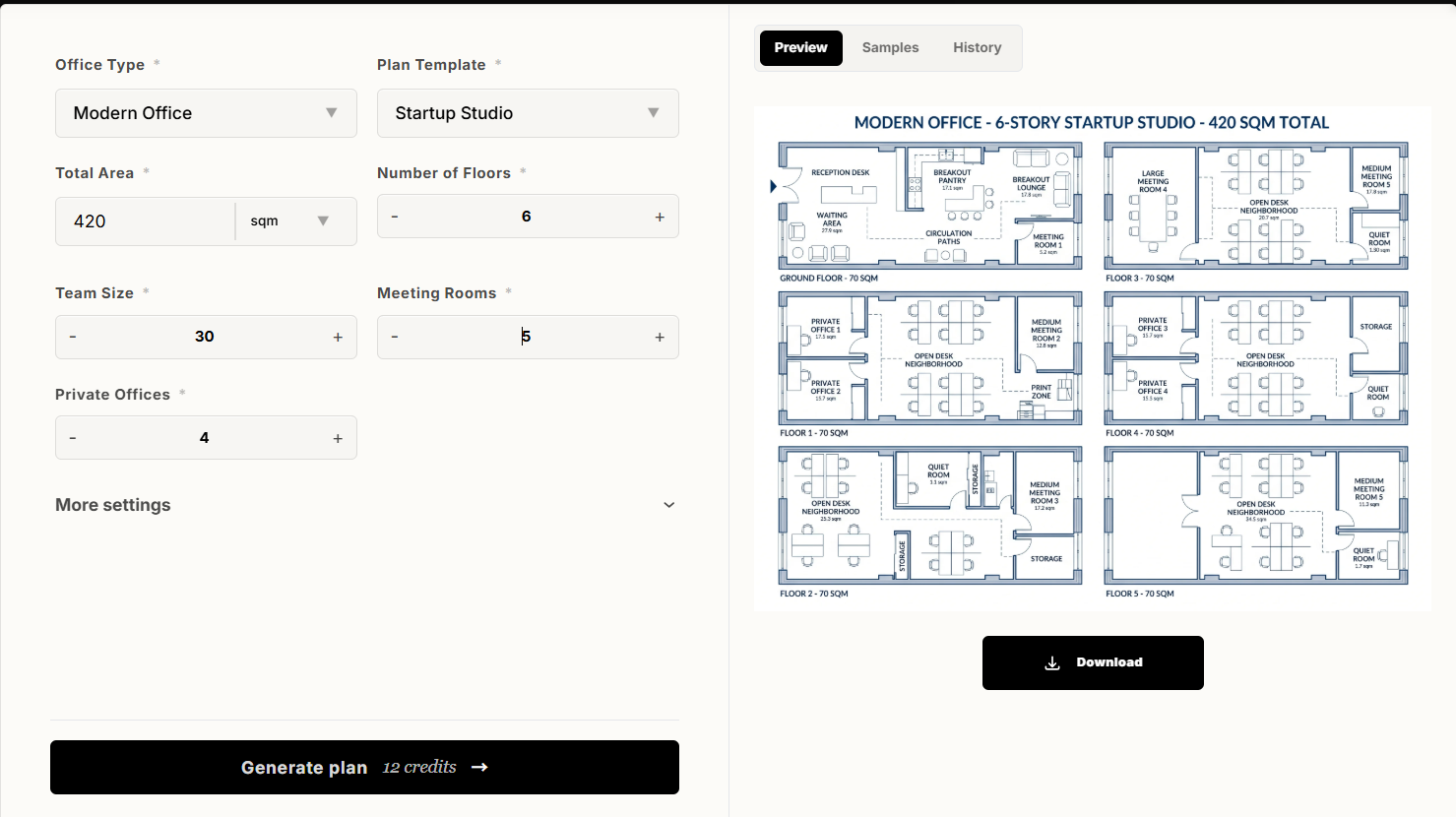
1. Choose Your Workspace Identity
- Office Type & Style: Whether you want a sleek, concrete-and-glass tech vibe, a warm creative studio, or a structured corporate financial floor, selecting your aesthetic sets the furniture and architectural rules for the AI.
- Plan Template: Start from a totally open-concept baseline, a classic cubicle matrix, or a hybrid hot-desking canvas to guide the algorithm’s foundational physics.
2. Inputs That Drive Spatial Accuracy
- Total Area: Input your exact square footage or square meters. The AI respects this boundary strictly, ensuring zero overlapping elements.
- Number of Floors: Managing a multi-story headquarters? Define your floor count, and the AI will logically partition departments and vertical traffic flow (elevators and stairwells).
3. Tailor It to Your Headcount
- Team Size: Tell the system exactly how many active desks you need. The generator instantly calculates structural clearance and optimal walking paths around every chair.
- Meeting Rooms: Specify your required count for large boardrooms, collaborative huddle spots, or quick zoom rooms.
- Private Offices: Input the number of closed-door executive suites needed, and the AI intelligently places them along window perimeters for premium lighting or nested internally for ultimate privacy.
The Magic Moment: Click Generate
Once you’ve tailored your parameters, you simply hit the Generate button.
Design the Perfect Office Floor Plan in Minutes with AI
Stop struggling with complex software. Our AI-powered office floor plan designer helps you create professional office layout plans for any workspace—from small startups to large corporate headquarters. Visualize, edit, and export your office space floor plan with ease.
In less than a minute, the generative algorithm runs thousands of spatial permutations. It factors in legal exit pathways, natural lighting distribution, and ergonomic spacing rules, presenting you with a high-resolution, fully-optimized 2D schematic and 3D visual preview.
Why Generative AI Beats Manual Drafting
Moving to a parameter-driven generation workflow changes the game for startup founders and facility managers a like:
- Instant Iterations: Don’t like where the boardrooms landed? Adjust your “Meeting Rooms” count or swap the “Plan Template” style and click generate again for a brand new alternative layout.
- Cost Efficiency: Shave thousands of dollars off the early conceptual phase before bringing your files to local architectural sign-offs.
- Data-Driven Ergonomics: The AI ensures desks aren’t jammed awkwardly against structural pillars and guarantees high-traffic zones remain completely unblocked.
Claim Your Next Blueprint on AIAI.com
Your physical layout directly determines how your team collaborates and feels on a Monday morning. Don’t leave your real estate investment to guesswork or clunky software.
Head over to AIAI.com, choose your style, plug in your team specs, and click generate to see your ideal workspace materialize instantly.
Creating CAD drawings has always required patience, technical skills, and familiarity with professional design software. While tools like traditional CAD Read more
Struggling to design eye-catching posters without graphic design experience? Discover how an AI poster generator can turn simple text prompts Read more

In the past, my workflow for a skincare client was a logistical marathon. Today, it’s a streamlined creative sprint. Let’s Read more

Want to see your favorite book couples move? Here is how an AI French kiss generator can turn static character Read more


