Planning a party is exciting, but designing the invitation can quickly become a headache. Then you open your phone and send a plain text message to the group chat that just says: “My place. 8 PM. Bring chips.” Or maybe a painfully bland email subject line like “Leo’s Bday Party, Oct 10th.”
Sure, it does the job, but it is also kind of boring.
We live in a time where everyone posts curated, high-quality photos of their morning coffee. Sending a dry text invite feels underwhelming. If you want to throw a party that people actually thrill to attend, you need to step up your game.
If you’ve thought about DIY-ing invitations but couldn’t be bothered with the effort, AI image generators are the answer. Here is how I faked being a graphic designer using Nano Banana Pro.

When you open your AI tool, you have two choices: let the AI do literally everything (including the text), or let it create a blank canvas for you to finish off.
Here is how both methods work.
Method 1: The “Do It All For Me” Approach
Best for: When you want a finished poster instantly and trust the AI’s spelling.
Modern AI tools have gotten much better at handling text. You can now tell the AI specifically what to write on the image, saving you from opening a photo editor later.
New Year’s Eve is coming up. The pressure is on. You want to host, but you are already stressed about cleaning your apartment and buying enough champagne.
Here is exactly what you can do to save time. I decided to let the AI handle the date and time so I didn’t have to lift a finger.
I typed in this prompt:
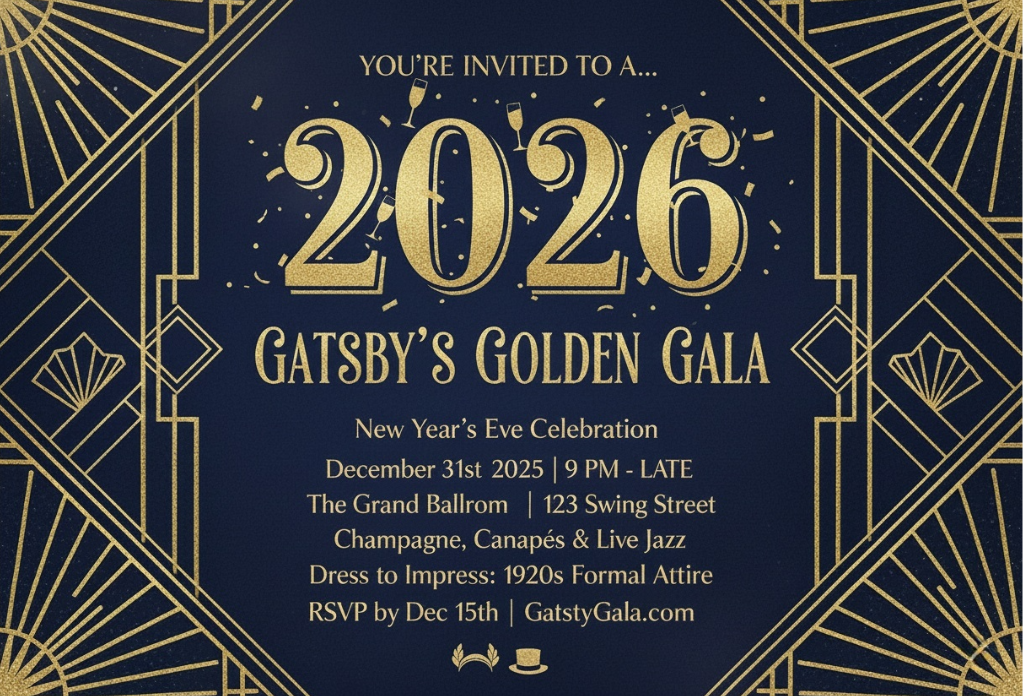
The Prompt: A Great Gatsby aesthetic, roaring 20s style NYE invitation with gold Art Deco geometric borders. In the center, large gold text says ‘2026’. Below that, text says ‘GATSBY’S GOLDEN GALA’. Underneath, smaller text reads ‘December 31st 2025’ and ‘The Grand Ballroom’ with the location 123 swing st. Time starts at 9pm, 1920s jazz age style, elegant and clean.
The Result:
Ten seconds later, I had a finished image that looked professional.
Pro Tip for Method 1:
If you go this route, keep the text short. AI is great at simple phrases like “NYE PARTY” or “LEO’S BDAY,” but it might struggle if you ask it to write a whole paragraph of directions.
Method 2: The “Blank Canvas” Approach
Best for: When you want total control over the font and readability.
This is my preferred method when I have a lot of specific info to share (like gate codes or specific times). You ask the AI to generate the vibe, but you tell it to leave room for you to type the details yourself.
Last month, I was planning a birthday party for my roommate who loves raccoons and 80s synth-pop. Good luck finding that combination on a stock photo site.
I went into AIAI.com and typed this:
The Prompt: A raccoon wearing neon shutter shades, DJing at a disco, purple and blue laser lights, retro 80s style art. Empty negative space in the center
The Result:
Ten seconds later, I had this hilarious, vibrant image that looked like an album cover.
I saved the image to my phone, opened Instagram, typed the date and time over the top of it, and sent it to her. She lost her mind. She posted it on her own story immediately. That never happens with a text message.
Why this works:
Adding phrases like “negative space,” “clean background,” or “leave room for text” prevents the image from becoming visually chaotic. You’re essentially telling the AI where not to draw, which makes the final invitation much easier to read.
Give It a Shot
If you have a gathering coming up, even if it is just a Friday night pizza hang, try making a proper visual for it.
Go over to AIAI.com’s text to image generator, type in something ridiculous or cool, and see what happens. It is free to try out. You have nothing to lose but a few minutes of browsing.
Your friends might still show up late. Someone might still spill a drink on your rug. But at least the invitation will look amazing.

Looking for New Year's manicure inspiration? Learn how to use the ultra-popular AI tool Nano Banana Pro to upload a Read more
Tired of watching your monthly AI generation credits vanish while struggling with out-of-sync voiceovers and rigid cropping? I spent months Read more
Unlock your best 2026! Discover how to design a stunning, aesthetic vision board that goes beyond pretty pictures—learn the secrets Read more
Discover Nana Banana Pro, the ultimate AI beard removal tool. Effortlessly create realistic clean-shaven photos with natural skin texture and Read more


