Transform Your Photos: Instant Background Removal, Effortless Perfection!
Ever struggled to perfectly cut out a subject from a photo? Whether it’s a product for your online store, a portrait for your profile, or an object for a creative design, manually removing backgrounds can be tedious, time-consuming, and often yields imperfect results. Blurry edges, jagged lines, or parts of the background stubbornly clinging to your subject are common frustrations.
Introducing AIAI.com’s powerful AI Background Remover! Harnessing advanced AI image-to-image technology, our tool makes professional-grade background removal incredibly simple and fast. You just need to upload your image to our dedicated page on AIAI.com, and in moments, you’ll receive a perfectly clean cutout with a transparent background. Best of all? This powerful transformation costs just 10 credits! Get ready to isolate any subject with precision and ease, opening up a world of creative possibilities for your photos.
Why You Need an AI Background Remover: Unlock Creative Potential
The ability to instantly remove image backgrounds is a game-changer for a multitude of personal and professional needs:
Enhance E-commerce & Product Photography
For online sellers, crisp product photos with clean, uniform backgrounds are crucial for attracting customers and boosting sales.
- Professional Look: Present products against a pure white or transparent background, making them stand out and appear more appealing.
- Consistency: Easily achieve a consistent look across all your product listings, elevating your brand image.
- Flexibility: Once the background is removed, you can place your product on any new background, creating dynamic marketing visuals.
AIAI.com’s AI tool helps e-commerce businesses create high-quality, professional product images quickly and affordably, without needing a photo studio or graphic designer.
Elevate Social Media & Personal Branding
From profile pictures to engaging stories, having control over your image backgrounds can significantly impact your online presence.
- Dynamic Profile Pictures: Cut out your portrait and place it on a custom, eye-catching background that reflects your personality or brand.
- Creative Content: Easily integrate yourself or objects into new scenes for memes, announcements, or artistic posts.
- Professional Headshots: Get a clean, distraction-free headshot for LinkedIn or professional websites.
AIAI.com’s AI Background Remover allows you to create more personalized, impactful, and visually appealing content for all your social media and personal branding efforts.
Streamline Graphic Design & Creative Projects
Designers, marketers, and hobbyists alike often need to isolate elements for their projects.
- Layering & Compositing: Effortlessly extract subjects to combine them with other images, create collages, or build complex designs.
- Marketing Materials: Design flyers, banners, and advertisements by placing cut-out elements onto custom backdrops.
- Digital Art: Use isolated figures or objects as components in digital paintings, illustrations, or unique artistic creations.
By automating the tedious task of background removal, AIAI.com’s AI tool frees up valuable time for more creative work.
How AIAI.com’s AI Tool Works
AIAI.com’s AI Background Remover utilizes sophisticated AI image-to-image technology to precisely identify and separate the foreground subject from its background. The process is entirely automated and remarkably accurate:
- Intelligent Subject Detection: When you upload your image, the AI instantly analyzes the content, identifying the primary subject (person, object, animal, etc.) within the frame.
- Precise Edge Definition: Using advanced algorithms, the AI meticulously traces the edges of the subject, distinguishing even fine details like individual hairs, delicate textures, or intricate object contours from the background.
- Background Elimination: Once the subject’s boundary is defined, the AI intelligently removes the entire background area, leaving your subject perfectly isolated on a transparent canvas.
- High-Quality Output: The result is a clean, sharp cutout image with smooth, natural edges, ready for immediate use in any project.
This image-to-image process means you simply provide the source image, and the AI delivers the transformed, background-removed output, no complex manual inputs or selections required.
See the Precision: Examples of AI Background Removal
Witness the effortless accuracy of AIAI.com’s AI Background Remover. Here are examples showcasing how our tool can perfectly isolate subjects from various types of images.
Perfect Product Cutout for E-commerce
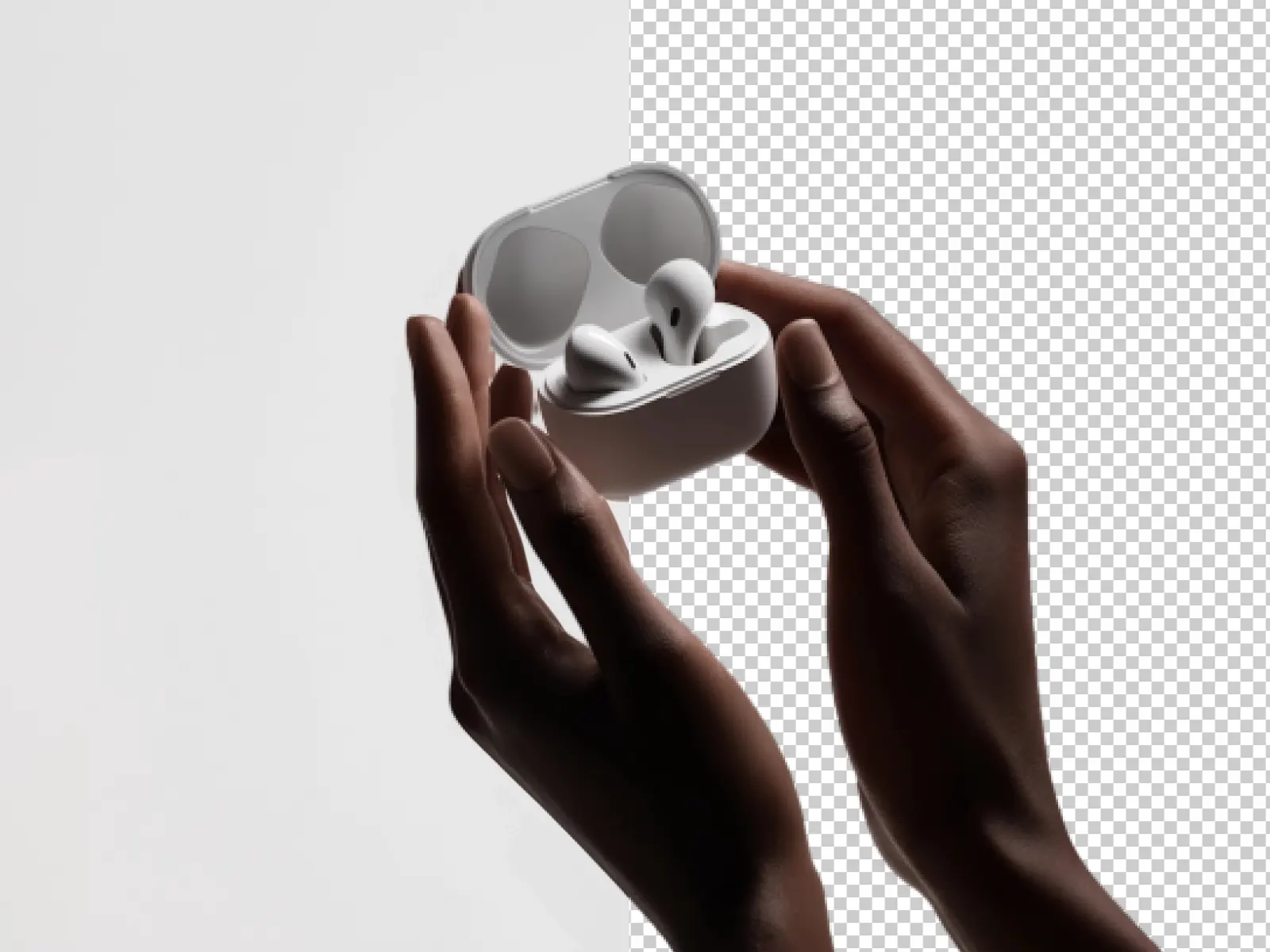
Imagine a product photo of a stylish handbag on a busy, textured background. Manually cutting it out would be a nightmare. AIAI.com’s AI cleanly separates the handbag, leaving it perfectly isolated on a transparent background, ready for any e-commerce platform or marketing campaign. All the fine details, stitching, and contours of the bag are preserved with crisp precision.
For example: Our AI technology precisely separates objects from backgrounds, placing them seamlessly on transparent backgrounds for effortless background replacement. Ideal for e-commerce platforms or marketing campaigns. Every intricate detail, stitch, and contour is preserved with crystal-clear precision.
Clean Portrait Cutout for Social Media Profile
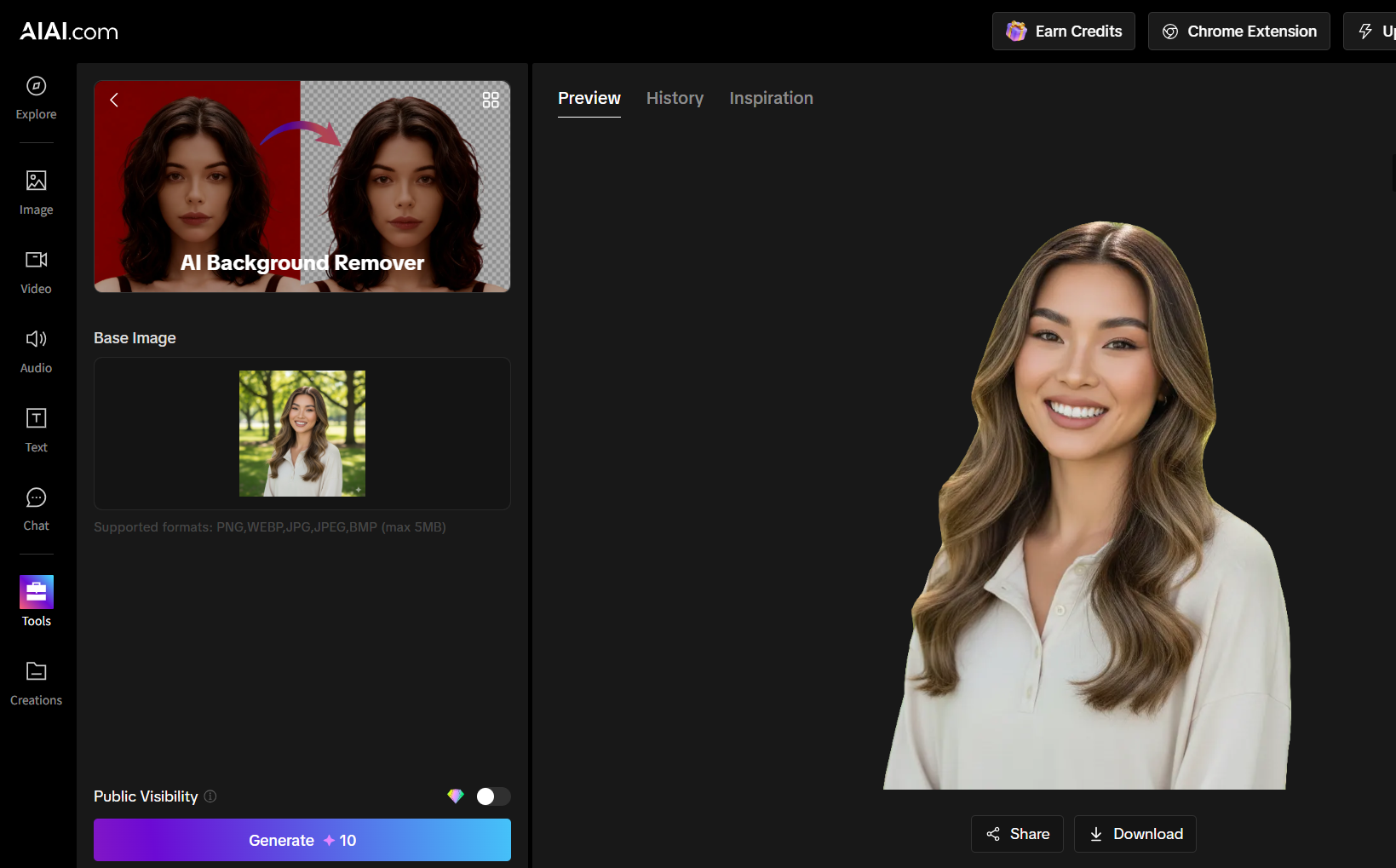
Consider a casual portrait of a person taken outdoors with a complex, leafy background. Such backgrounds can be distracting for a profile picture. Our AI precisely cuts out the person, including individual strands of hair, leaving a clean, transparent image that can then be placed on any solid color or new scenic backdrop, perfect for social media or professional profiles.
For example: Upload a portrait photo of a woman with a background of blurred green leaves and tree trunks. After using the background removal tool, the subject is perfectly extracted. Smooth masking is achieved around her hair, face, and clothing edges, with even individual strands of hair meticulously separated from the complex foliage background. The final result is an image retaining only the subject’s main body.
How to Get Started with AIAI.com’s AI Background Remover
Utilizing this powerful tool is incredibly simple and designed for maximum convenience:
- Visit the Designated Page: Go to AIAI.com and navigate to our specific AI Background Remover tool page.
- Upload Your Image: Click the upload button and select the image file from your device that you want to process.
- Automatic AI Processing: Our AI will automatically analyze your image and perform the background removal. There are no manual selections or complicated steps.
- Instant Result & Download: In just moments, you’ll see your image with its background perfectly removed. You can then download your new image with a transparent background directly to your device.
For just 10 credits, you get professional-grade results instantly.
Unlock the Power of Flawless Cutouts Today!
Stop wasting time on manual background removal and embrace the future of photo editing. AIAI.com’s AI Background Remover offers a fast, accurate, and incredibly affordable solution to isolate any subject with ease. Whether you’re an online entrepreneur, a social media influencer, a graphic designer, or simply someone who loves to enhance their photos, our AI tool is your ultimate partner.
Transform your images, elevate your projects, and unleash your creativity with perfectly clean cutouts.
Nano Banana Pro: Unveiling the Updates and Usage Tips! This article is about Google DeepMind's Nano Banana Pro (Gemini 3 Read more
How to Change Eye Color Using AI with Nano Banana Pro Changing eye color in photos used to require manual Read more
ChatGPT-5 Technical Analysis: Core Capabilities and Applications Guide ChatGPT-5 has officially launched after much anticipation and many development iterations. This Read more

With the rise of generative AI, creating stunning videos has never been easier. I recently used Meta AI to generate Read more


