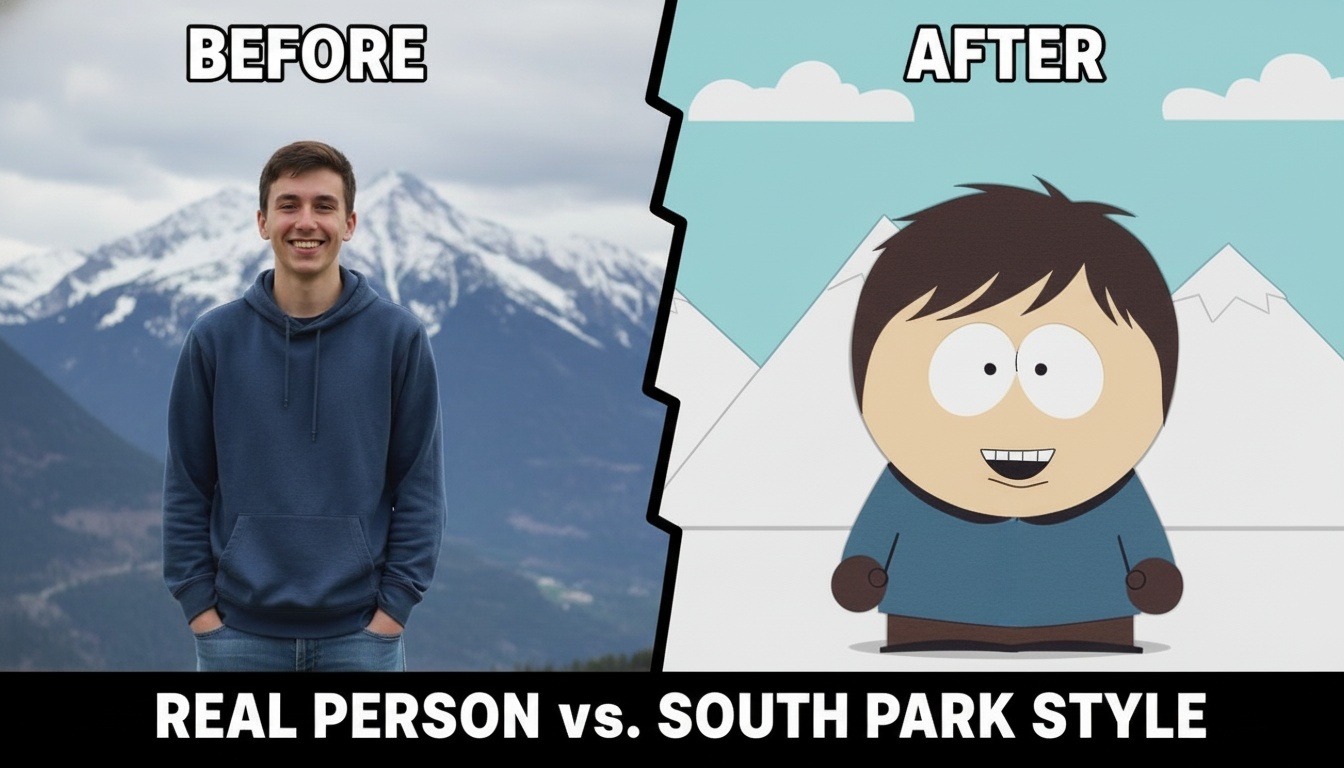
Have you ever noticed the unique style of South Park? The South Park art style is known for its distinctive low-fi, handmade look. Characters are designed with simple geometric shapes, and the deliberately choppy, frame-by-frame animation gives a rough, raw feel that makes the style instantly recognizable. While newer episodes feature richer lighting, textures, and more complex movements, the iconic character designs remain largely unchanged.
Ever wondered how you’d look in South Park? Now, transforming yourself into a resident of Colorado’s most famous fictional town has never been easier. With the high-performance Nano Banana Pro engine, our platform allows you to South Park make characters that look just like you—or a much funnier, satirical version of yourself—using professional-grade image-to-image technology. You can also adjust the character’s hairstyle, outfit, expression, or overall style according to your preferences, giving you full control over how you want your South Park version to appear.
South Park Make Characters: Customize Your Look
One-Click Generation
Simply upload a photo, and the AI can transform you into a South Park character in just a few seconds—no complicated design skills needed. For example, upload a selfie, and within moments, a full character based on your photo will appear, including your hair, facial features, and basic outfit, letting you see yourself in the South Park world instantly.
Customizable Details
You can freely adjust your character’s hairstyle, outfit, expression, and accessories to match your preferences. For instance, you can turn short hair into long hair, swap in your favorite jacket, or add sunglasses, earrings, and other details. You can also go for a more exaggerated, humorous look—like over-the-top expressions or bright, bold clothing—so that friends will immediately recognize your “South Park version.”
How to Create Your South Park Character, Step by Step
With the basics covered, it’s time to put them into action. Here’s how to transform your photo into a South Park character, step by step.
Step 1: Upload Your Base Image
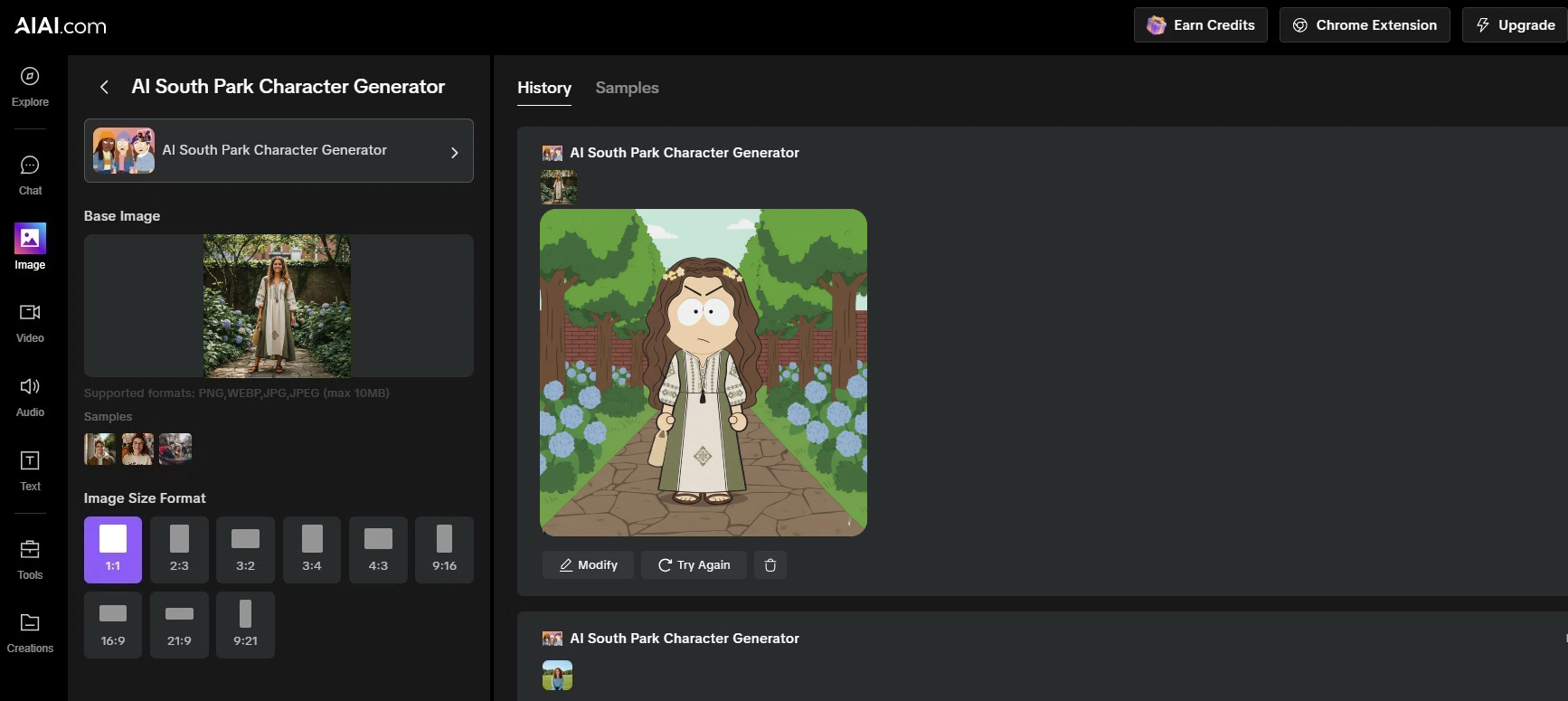
Click the “Upload” button to provide your base photo. Before moving forward, select your Aspect Ratio from our presets (such as 1:1 for iconic social media avatars or 16:9 for cinematic desktop wallpapers).
Pro Tip: A clear, front-facing portrait with good lighting helps the AI accurately translate your unique features into the classic paper-cutout aesthetic.
Step 2: Locate the AI South Park Character Generator
With your image and size set, navigate to our dashboard and locate the AI South Park Character Generator.
Step 3: Generate, Modify, or Try Again
Click “Generate” to see your character transformation. The AI will create a South Park-style character based on the photo and settings you provided. Wait a few seconds, and your generated image will appear.
If the result isn’t exactly what you want, you have two options:
Modify: Click this button to adjust your prompts or settings and fine-tune the existing result. For example, you can change the character’s hair color from brown to blonde, switch the outfit from casual clothes to a jacket and scarf, or tweak the facial expression to make the smile bigger or look more playful. This allows you to improve the character without starting over.
Try Again: Click this button to let the AI generate a completely new version using the same settings. If you’re not satisfied with the generated image, you can start fresh and try again. Each attempt gives you a brand-new result while keeping your original preferences intact.
Step 4: Download and Share
Our platform uses Nano Banana Pro to ensure that every image-to-image conversion is lightning-fast and high-quality. Experience the smoothest way to south park make characters online today.
Finished learning about South Park Make Characters? Do you have any questions, or are you ready to try it yourself? Upload a photo, tweak your character’s details, and create a one-of-a-kind version of yourself in the South Park universe! Don’t forget to share your creation with friends and see what fun results everyone comes up with!
Need a logo but have zero design skills? Learn how to use an AI logo generator to turn simple words Read more
This guide explains how to generate hyper-realistic food preview images using Nano Banana Pro. It covers step-by-step techniques for crafting Read more
Looking for a reliable free video watermark remover? I tested AIAI.com. It uses AI technology to automatically remove watermarks while Read more

Turn sketches, concepts, or images into precise technical drawings with an AI CAD generator. Use text-to-image and image-to-image AI to Read more


